

A campaign can report conversions and still lose money. Diagnosing unprofitable Google Ads campaigns starts with the business economics: do qualified customers generate enough value to cover ad spend and the costs of serving them? A low cost per lead or a strong-looking Google Ads return means little if leads don’t become customers.
It’s reasonable to expect the platform’s numbers to explain what’s wrong. But those numbers are useful only when conversion tracking is accurate and performance is judged against real business outcomes. This guide explains how a paid media professional assesses profitability and traces likely causes of losses, rather than treating every weak result as a bidding problem.
A thorough diagnosis checks conversion tracking, policy disapprovals, billing, search terms and negative keywords, bidding status, auction competition, and campaign diagnostics. The goal is to locate the failure point, distinguish measurement errors from genuine performance problems, and identify what to change before exposing more budget.
Key Takeaways
- Profitability depends on qualified customers and business value, not conversion counts alone.
- A professional traces whether tracking, billing, or policy issues are distorting campaign results.
- Search terms and negative keyword conflicts can reveal spend going to the wrong intent.
- Bidding status and auction data help distinguish a strategy still learning from rising competitive pressure.
- Campaign diagnostics can surface delivery problems, but the findings need to be read alongside actual business outcomes.
How a professional checks policy disapprovals, billing, and conversion tracking
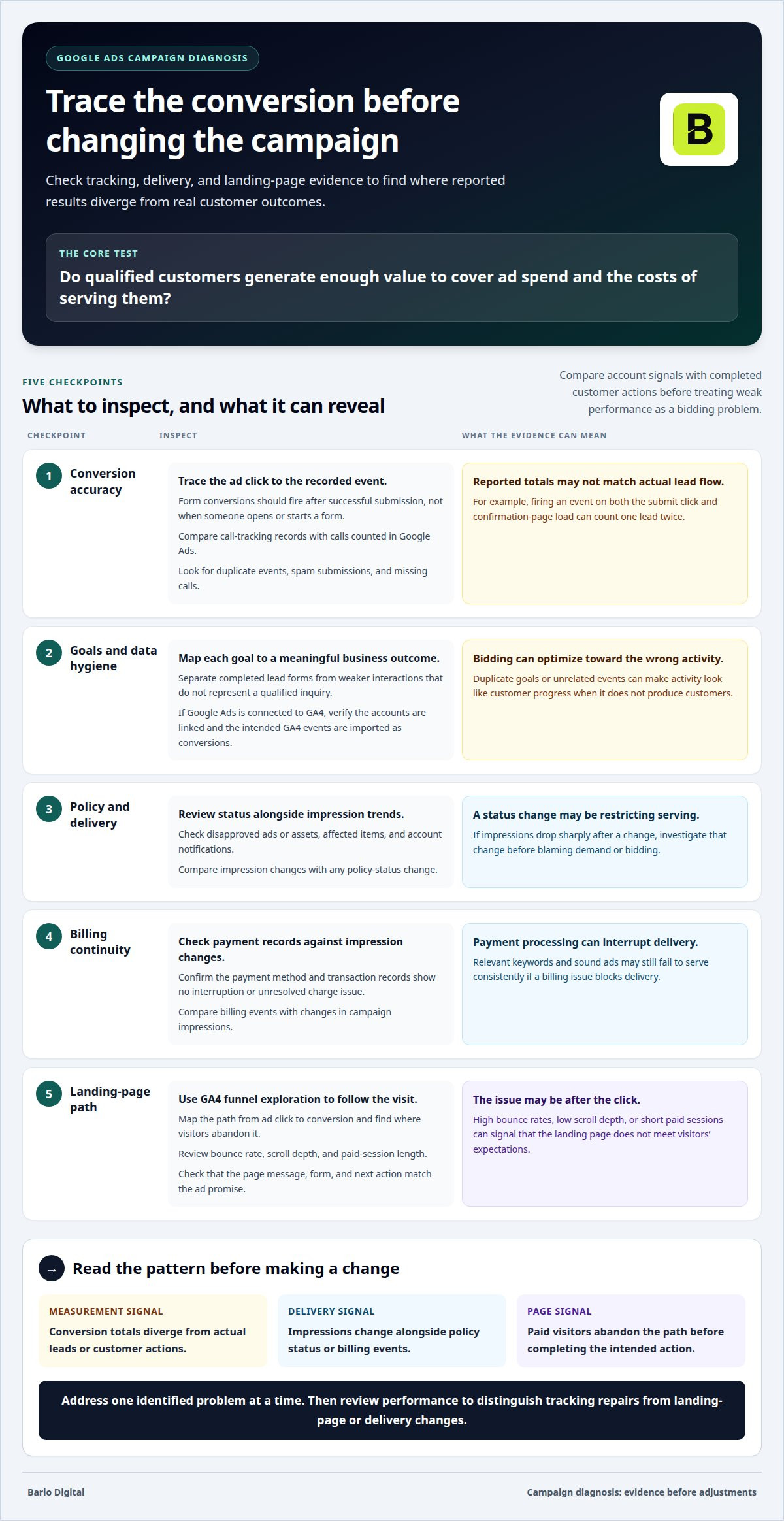
A professional audits Google Ads conversion tracking by tracing each reported conversion to a completed customer action. The review also checks disapprovals and billing, since delivery or payment problems can affect impressions and performance.
-
How a professional audits conversion tracking accuracy
Trace each conversion from the ad click to the recorded event. Check that a form conversion fires only after successful submission, not when someone opens or starts the form. Compare call tracking records with calls counted in Google Ads. Duplicate events, spam submissions, or missing calls can make reported results diverge from actual revenue.
For example, a form that fires both when someone clicks submit and when the confirmation page loads can count one lead twice. The conversion total then looks stronger than the actual lead flow.
-
How a professional reviews goals and data hygiene
Ask the professional to map each Google Ads goal to a meaningful business outcome. Separate actions that signal intent, such as a completed lead form, from weaker interactions that don’t represent a qualified inquiry. If Google Ads is connected to Google Analytics 4, verify that the accounts are linked and the intended GA4 events are imported as conversions.
Keep the conversion set clean. Duplicate goals or unrelated events can steer bidding toward activity that doesn’t produce customers.
- Inspect policy statuses and campaign delivery. Disapproved ads or assets can restrict serving, while billing problems can interrupt delivery. Review affected items alongside impression trends and account notifications. If impressions drop sharply after a status change, investigate that change before attributing the decline to weak demand or poor bidding.
- Review billing alongside policy status. Confirm that the account’s payment method and transaction records show no interruption or unresolved charge issue. A campaign can have relevant keywords and sound ads, yet fail to serve consistently if payment processing blocks delivery. Compare billing events with impression changes rather than changing targeting without evidence.
- Have the professional compare paid-traffic behavior with landing page performance. In GA4, funnel exploration can map the path from an ad click to a conversion and show where users abandon it. High bounce rates, low scroll depth, and short paid sessions can signal that the landing page doesn’t meet visitors’ expectations. Check whether its message, form, and next action match the ad promise.
Address one identified problem at a time. This keeps the next performance review useful and helps distinguish tracking repairs from landing-page or delivery changes. For brands needing broader creative and strategic execution to fix these funnel disconnects, working with Indigo Collective Group can help align campaign creative and landing pages with measurable business outcomes.
Why do my Google Shopping ads get clicks but no sales?
Clicks show that products attract attention, not that shoppers will buy. A professional traces the gap through product data, landing-page behavior, and sales quality.
-
How a professional checks engagement and landing-page signals
Start by comparing paid-traffic sessions with product-page actions. In GA4, funnel exploration shows whether shoppers move from an ad click to a product view, cart, and purchase, or abandon the path. High bounce rates, low scroll depth, and short sessions can signal a mismatch between the ad and landing page.
Check that the product page delivers on the ad’s promise. A click on a specific shoe should lead to that shoe’s page, with clear pricing, availability, and purchase options.
-
How a professional compares performance across campaign segments
Compare results by keyword or search query, device, location, and audience. Separate segments that produce purchases from those that generate clicks without sales, then inspect the landing pages and products behind each pattern. Google Ads search terms and segment reports can reveal where spend is reaching shoppers with different intent.
For location targeting, “Presence or interest” can reach people outside the intended market. For location targeting, compare the setting with the business’s intended sales area.
-
How a professional checks metrics and campaign profitability
Review average CPC and conversion rate using the last 30 days of campaign data. Then compare purchases and revenue against ad spend and product economics. A 3x ROAS may be profitable for one business and unprofitable for another; the deciding factor is profit after product and other direct costs, not revenue alone.
For lead campaigns, assess qualified leads and downstream customers, not just form counts. Call tracking should connect ad calls with their outcomes, so a short, irrelevant inquiry isn’t treated as equivalent to a qualified prospect. Core metrics include clicks, CPC, conversion rate, qualified conversions, revenue, and return against business goals.
-
How a professional decides whether to pause or restructure
Before pausing, identify whether the loss comes from a weak product, poor traffic, the landing page, or measurement. For Shopping, inspect Merchant Center feed quality: product titles, identifiers, images, price, and availability must accurately describe the offer. Google Shopping ads show around 70 characters of a product title on most placements, so put distinguishing product details early.
Restructure when a product group, query, or audience repeatedly spends without useful sales, while stronger segments can remain active. Pause only after ruling out feed or tracking problems. Change one thing at a time, then assess it once enough clicks and sales provide evidence beyond normal week-to-week variation.
How a professional reviews match types and negative keyword conflicts
Compare the searches triggering ads with the intent each campaign should target. When diagnosing unprofitable Google Ads campaigns, examine how keyword choices, match types, bids, and exclusions affect spend and lead quality.
-
How a professional checks search-term relevance
Review the Google Ads Search Terms Report against the account’s target keywords and intended customer actions. It shows which queries triggered ads and how spend is allocated. A home-services campaign targeting repair bookings, for example, should distinguish service requests from searches for instructions, product research, or jobs.
Review match types alongside each query. Broad reach can surface useful variations, but it can also expose a campaign to unrelated intent. Exact wording alone doesn’t prove relevance. Consider what the searcher appears to need and whether the landing page answers that need.
-
How a professional finds negative keyword conflicts
Have the professional compare search terms with negative keywords at campaign and account levels. A negative can block valuable traffic when its wording overlaps with a high-intent query. For example, excluding “repair” across an account could suppress searches for a repair service, even if another campaign specifically targets those jobs.
Review blocked or absent queries against the intended campaign structure before adding exclusions. The goal isn’t to remove every low-performing term immediately. Separate irrelevant searches from qualified intent without preventing the right campaign from serving.
- Ask the professional to assess keyword research alongside search volume and bid data. Search volume indicates observed demand for a topic, while bids help frame competition for that traffic. Neither establishes profitability. A keyword with a Quality Score of 9 can still lose money if it attracts the wrong audience or produces poor-quality leads.
Use the evidence to refine target themes, not simply chase the largest volume. A narrower phrase may bring stronger intent, while a broad theme may spend on research queries. Weigh relevance, conversion outcomes, and business value together when diagnosing unprofitable Google Ads campaigns.
- Have the professional connect search terms to recorded conversions and qualified outcomes. A query that generates clicks but no qualified actions may need a different match type, a negative, or a separate campaign. A query with fewer conversions may still matter if it consistently brings valuable prospects. Compare actual outcomes before removing it.
- Make one controlled change at a time. Add or adjust a negative, revise a match type, or reorganize a keyword group, then observe the resulting traffic and actions. Changing several targeting rules together obscures which adjustment improved relevance and which cut off useful searches. Keep the diagnosis grounded in evidence rather than assumption.
How a professional reviews Smart Bidding statuses and auction competition
Automated bidding can spend efficiently only when its target and conversion signals reflect business value. A professional checks strategy status, budget limits, and auction changes before blaming ad copy or clicks.
-
How a professional reviews Smart Bidding statuses
Ask the professional to inspect the campaign’s bidding strategy status and recent changes. “Learning” means the strategy needs time to stabilize, so repeated edits can disrupt its adjustment. The review compares the selected target with actual qualified conversions, not just all recorded actions.
-
How a professional assesses auction competition and budget limits
Review Auction Insights for shifts in competitor overlap and outranking. Rising competition can coincide with higher costs or declining visibility, but the report doesn’t prove that competitors caused every performance change. Compare the timing with impression share, clicks, and changes to targeting or ad copy.
Then inspect Search Lost IS, which indicates impression share lost through limited budget or weak Ad Rank. “Limited by budget” signals missed impressions; Search Lost IS (budget) measures reach lost because of underfunding.
- Compare the daily budget with the account’s monthly budget and actual spend. Google Ads can spend more than its daily cap on high-traffic days, while monthly spend won’t exceed the set monthly budget. A temporary daily spike alone doesn’t establish a billing error. The key question is whether total campaign spend produces qualified outcomes at an acceptable return.
If Search Lost IS (budget) is high, increasing the budget may buy more reach, not more profit. First check whether existing clicks and conversions justify additional exposure. If weak Ad Rank limits visibility, changing the budget won’t address the underlying constraint.
- Evaluate automation in the context of the campaign setup. In 2026, Google Ads relies heavily on automated bidding, Performance Max, responsive assets, and privacy-safe tracking. These systems still depend on useful conversion signals and relevant campaign inputs. If irrelevant actions count as conversions, automated bidding can pursue activity that looks successful in-platform but fails commercially.
Compare the strategy’s target, status, conversion quality, and auction conditions before changing settings. Increased competitor overlap, a budget constraint, and a learning status point to different causes. Isolate the constraint first, then test a single adjustment and assess its effect on qualified results.
Where a professional finds campaign diagnostics in Google Ads
Campaign diagnostics are a delivery-health check, not a verdict on profitability. Use them to locate barriers, then compare those findings with business outcomes.
- Open the relevant campaign in Google Ads and locate its campaign diagnostics. The view summarizes health using performance from the past week and checks more than 90 signals across core campaign components. Start with the affected campaign, not an account-wide average. That keeps an issue tied to the traffic, settings, and spending pattern that produced it.
- Read each diagnostic as a specific delivery clue. Google Ads checks whether the campaign served any impressions in the past week. If it served none, inspect whether it can enter auctions and whether its configuration or eligibility restricts delivery. If impressions appeared, the campaign served, but that alone says nothing about relevance, qualified actions, or revenue.
- Check the budget signal next. Diagnostics checks whether a campaign spent a majority of its average set daily budget in the past week. If it didn’t, a budget increase may not address the cause. Review other delivery constraints and traffic quality first. If the campaign spent most of that average daily budget, compare the resulting clicks and conversions with the business goal.
- Use diagnostic findings to guide a deeper account review. A delivery alert can explain why relevant traffic didn’t appear, but it can’t establish whether existing clicks produced profitable customers. Compare search terms, conversion quality, landing-page behavior, and ad spend. For example, impressions from irrelevant queries point to a targeting issue, not necessarily a delivery failure.
- Record the diagnosis before changing settings. Identify the signal, its likely effect, and the next controlled action. If diagnostics flags limited delivery, isolate that constraint; if delivery appears healthy, examine the path from click to qualified conversion. Then change one factor and evaluate its effect against the past-week baseline. This helps distinguish a genuine improvement from noise or a new source of wasted spend.
The takeaway is simple: campaign diagnostics shows where delivery may be impaired, not whether the campaign makes money. Use its past-week signals to focus the investigation, then measure performance against qualified outcomes and revenue.
Barlo Digital: Storm response campaigns for roofers
Barlo Digital’s storm response campaigns are designed for roofers targeting demand after hail or wind events. They connect a specific service need with advertising and landing pages built around storm-related inquiries.
This is a specific use case, not a general fix for every unprofitable Google Ads campaign. First identify whether the problem is measurement, targeting, campaign delivery, or demand. Storm response makes sense when storm-related roofing work is the business objective and campaign performance can be assessed against that objective.
Make the next campaign decision evidence-led
Don’t let another round of budget changes stand in for a clear diagnosis. Address the cause you’ve identified, whether that means correcting measurement, changing campaign management, or reassessing whether paid search fits the business goal.
Diagnosing unprofitable Google Ads campaigns matters when the findings lead to a decision the business can evaluate. Barlo Digital manages ecommerce ads across Google, Meta, and TikTok, and provides ecommerce tracking and measurement audits. Local SEO and AI search address a different need: improving visibility beyond paid campaigns.
Bring the account’s commercial goals and the questions raised by its performance review into the conversation. Contact Barlo Digital about an ecommerce ads audit to decide on a clear next step.
Frequently Asked Questions
What Does Profitable Actually Mean in Google Ads?
A Google Ads campaign is profitable when the customers it acquires generate enough contribution to cover advertising and relevant business costs. Revenue alone can mislead: a sale may bring in money but leave too little after product, fulfillment, and operating costs. For lead generation, assess whether leads become paying customers and what those customers contribute, rather than treating every recorded form submission as a financial win.
Can a bad product feed really make Shopping ads unprofitable?
Yes. Inaccurate product information can put an ad in front of the wrong shopper or create a mismatch after the click. A professional compares the Merchant Center listing with the actual product page, including the selected variant, availability, and displayed price. If the ad promises one item but the landing page presents another, the feed can undermine sales even when the campaign attracts relevant traffic.
How long should a professional wait before judging a fix?
Wait until the change has enough clicks and sales to distinguish its effect from normal week-to-week variation. There’s no reliable fixed waiting period for every account because traffic volume and purchase frequency differ. For example, a change affecting a low-volume campaign may need more time to produce meaningful evidence than one affecting a campaign with steady sales.
Step 2: Does your paid media professional assess whether your margins survive your real click cost?
Yes. Relate click cost to the campaign’s conversion rate and the contribution each sale or qualified lead can generate. A costly click may still make sense if it reliably leads to a valuable customer; a cheaper click can waste money if it rarely converts. For lead campaigns, the analysis also needs the proportion of inquiries that become paying customers, not just the platform’s lead count.
Step 3: Which searches is your paid media professional checking that you are paying for?
Examine the actual search queries that triggered ads, then group them by intent and business relevance. A campaign for a service shouldn’t treat a search for instructions, employment, or a different service as equivalent to a purchase inquiry. Check whether account exclusions block valuable searches and whether queries producing conversions align with the intended customer.
Step 4: Is Your Structure Hiding the Losers?
It can. A campaign-level average may hide a product group or targeting segment that consumes budget without producing useful outcomes. Break performance into meaningful groups and check whether budgets combine proven products with untested ones. Separating those groups can reveal weak performance and prevent a few strong products from masking ongoing losses elsewhere in the account.
How to calculate Google Ads ROI ROAS CPA and break-even cost per conversion
Calculate ROAS by dividing conversion value by ad spend. CPA is ad spend per conversion; break-even cost per conversion is the profit that conversion generates after product and other direct costs. Set the target above break-even to leave room for operating expenses, and judge ROI using actual business profit rather than tracked sales alone.

Article by
Carlos Benavides
Carlos Benavides founded Barlo Digital and is its Director of Paid Media and Performance. He has fifteen years in direct-response marketing, more than $50M in lifetime ad spend, and a B.S. in Computer Science, which is why tracking at Barlo Digital is built by hand. Barlo Digital is a director-led paid media and search agency serving US ecommerce brands, home-service companies and practices.


