
The real comparison isn’t whether an automated answering system picks up. It’s what happens after the caller explains why they’re calling. The system can gather details, qualify the lead, route or transfer the call, and offer appointment booking when configured to do so. Those steps determine whether an answered call leads to a useful next action.
Price matters, but the billing model matters just as much. A low monthly fee tells you little if call limits, usage charges, setup work, or essential features change the actual cost. Learn how AI answering works and compare pricing, call handling, caller qualification, transfers, and booking options without mistaking a feature list for a working process.
The practical test is simple: match the system’s capabilities and fees to the calls your business needs handled. This guide explains the trade-offs so you can see what the service will do, where human handoffs matter, and which costs to examine before choosing.
Key Takeaways
- Compare subscription, usage-based, and call-volume pricing by looking beyond the headline fee to what each plan includes.
- Assess how calendar and CRM integrations support accurate caller records, appointment scheduling, and follow-up.
- Map the call journey from greeting to qualification, transfer, or booking to see where automation fits and where a human handoff matters.
- Compare routing rules against your real call types so urgent requests, sales inquiries, and routine questions reach the right destination.
- Use the decision guide to weigh feature fit, call handling, and total cost against your business’s actual needs.
What is an AI call answering service?
An AI receptionist uses voice recognition and conversational software to handle incoming calls through a business phone system. It can identify why someone is calling, collect contact details, answer configured questions, and start an action such as taking a message, transferring the call, or requesting an appointment. The key test is whether the caller’s request leads to an accurate, useful next step.
For example, the system could collect a caller’s name and preferred appointment time, then pass the request to staff. With live calendar access, some systems can check availability, offer a time, and confirm the caller’s selection. Google Calendar, Microsoft Outlook, and Office 365 are calendar integration examples.
Privacy, consent, and call-recording requirements depend on the states involved and how calls are handled. Configure disclosures, recording practices, and transcript access to meet the rules that apply to your business and callers.
Phone systems and CRM platforms can connect through a built-in integration or an API, depending on the service. A VoIP system or PBX may route calls, while a CRM stores caller details and outcomes. Confirm that the system supports the specific phone platform and CRM workflow your team uses.
Risks include misheard details, incomplete responses, and difficulty handling unusual requests. AI is also less suited to emotionally complex conversations, where a person can use judgment. Set up a transfer path for callers who need human support instead of relying on automation to handle every situation alone.
CRM syncing should capture more than a new contact. It can record the caller’s number, reason for calling, qualification details, and outcome, such as a transfer or needed follow-up. Test the full flow by placing a call, reviewing the CRM record, and checking that the result appears accurately without duplicate entries.
Business-system integrations shape what happens next. Calendar access can support scheduling, CRM connections can organize lead follow-up, and an EMR integration may support relevant healthcare workflows. Limit shared information to what the task requires. A failed sync can leave staff with an answered call but no usable record.
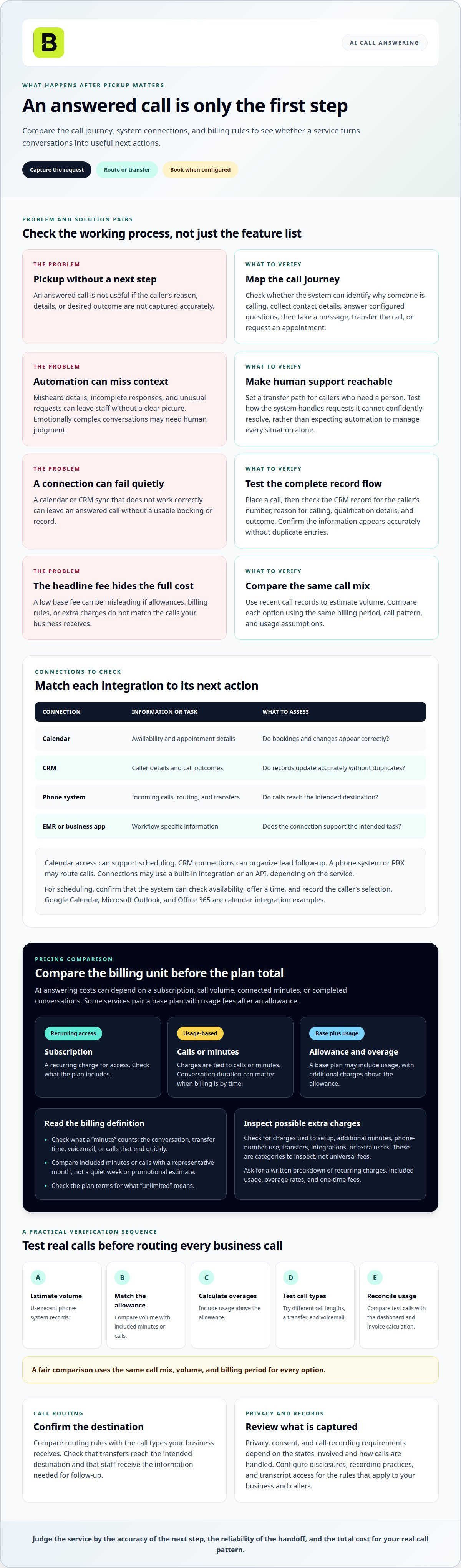
| Integration option | Typical information handled | What to assess |
|---|---|---|
| Calendar | Availability and appointment details | Whether bookings and changes appear correctly |
| CRM | Caller details and call outcomes | Whether records update without duplicates |
| Phone system | Incoming calls, routing, and transfers | Whether calls reach the intended destination |
| EMR or business app | Workflow-specific information | Whether the connection supports the intended task |
Choose integrations based on the next action callers need, such as scheduling, lead follow-up, or a transfer.
AI answering service pricing models and extra fees
Compare the billing unit before comparing plan totals. AI answering costs can depend on a subscription, call volume, connected minutes, or completed conversations.
Pricing Models and Billing
A subscription charges a recurring amount for access, while usage-based billing ties charges to calls or minutes. Some services combine a base plan with usage fees after an allowance. Short and long conversations cost the same only if the provider bills per call, not by duration.
Calculate a sample month using your call records. Separate answered calls, voicemails, transfers, and calls that reach a person. Then compare the same volume across billing models. A low base fee can lead to a higher actual bill if extended conversations or overages trigger extra charges.
Plans and Included Minutes
Plans may bundle a set amount of usage and charge for additional volume. The difference may reflect call capacity, features, and included minutes, so compare the allowance before treating plan prices as equivalent.
Read the plan’s definition of a “minute.” Check whether it counts the full conversation, transfer time, voicemail, or calls that end quickly. Also inspect what “unlimited” means in the plan terms. Compare included usage with a representative month of calls, not a quiet week or promotional estimate.
Extra Fees and Pricing Verification
Look for charges tied to setup, additional minutes, phone-number use, transfers, integrations, or extra users. These are cost categories to inspect, not universal fees. The actual total depends on the plan’s billing rules and your call pattern. Ask for a written breakdown of recurring charges, included usage, overage rates, and one-time fees.
Verify the arithmetic with a controlled test before routing every business call. Place sample calls of different lengths, try a transfer, and leave a voicemail. Record each event in the provider’s usage dashboard, then compare it with the invoice calculation. This can catch mismatches between a quoted allowance and how the system counts conversations.
Use this sequence to compare plans:
- Estimate monthly volume from recent phone-system records.
- Match that volume to included minutes or calls.
- Calculate charges for usage above the allowance.
- Check whether instant transfers, voicemail, or integrations affect billing.
- Reconcile the test calls against the provider’s usage report.
A fair comparison uses the same call mix, volume, and billing period for every option. Otherwise, a low advertised plan can hide the cost of the calls your business actually receives.
Inbound call handling, caller qualification, transfers, and appointment booking
The best AI answering service is the one that handles your main call types and routes exceptions clearly. Callers need a straightforward path from their first request to a booking, an answer, or a person.
Sales and Support Call Handling
Sales calls need qualification and a useful next step; support calls need accurate answers, issue capture, or escalation. An appointment-based business also needs calendar availability and booking confirmation. Choose features around the actual caller journey, not a long feature list.
Look for intent recognition, configured questions, accurate message capture, and clear transfer rules. For example, a sales caller could provide their location and requested service before the system routes the inquiry. A support caller reporting an urgent problem could be transferred instead of receiving a routine answer.
What features should you look for in an AI phone answering service? Prioritize reliable call capture, caller qualification, appointment booking, calendar coordination, and transfers to the right person. The right combination depends on whether calls are mainly sales inquiries, support requests, or appointment requests.
Call Reliability and Human Transfers
Modern speech recognition systems often exceed 95% accuracy in commercial environments. That figure describes recognition performance, not whether every caller’s request or booking will be handled correctly. Test names, addresses, accents, background noise, and changes to appointment details using realistic calls.
Set transfer triggers for requests the system cannot resolve, sensitive conversations, and callers asking for a person. A human can handle emotionally complex discussions more effectively than AI. Define each transfer destination, such as a sales queue, support agent, or designated staff member, and specify what information accompanies the call.
CallRail’s survey found that 50% of consumers said they would use AI to book an appointment. Booking should still be tested end to end: the system checks availability, confirms the selected time, and records the appointment. If callers receive a scheduling link instead, confirm it opens the correct calendar and makes the next step clear.
Appointment management also includes changes and reminders. Decide how callers reschedule or cancel, where staff see new bookings, and how reminders are sent. A confirmation should state the selected time and relevant details; reminders should follow the business’s established process.
Call handling also affects whether callers stay with the business. In a CallRail survey of 1,000 U.S. consumers, 78% said they had abandoned a business after an unanswered call, and 82% said they would call a competitor. Test the system with sample calls, then review transcripts, routing, booking records, and transfer outcomes. That reveals whether the full call journey works, not merely whether an AI phone agent picks up.
Call routing and lead qualification
Routing only works when each caller’s next step is defined. Set qualification questions, destination rules, and fallback actions before sending calls through the system.
For a roofing inquiry, the system might capture the caller’s name, service address, roof issue, and preferred appointment time. A support call could instead capture the account number and problem, then route by issue type. Keep questions focused on the decisions staff actually need to make.
Lead capture should preserve the details that make follow-up possible: caller identity, contact number, reason for calling, location, and requested action. A missed field can turn a captured conversation into an unusable record. Test a sample call, then compare the transcript and CRM entry with what the caller said.
Qualification is a filter, not a verdict. A home-service company might ask whether the caller needs a repair or estimate, where the property is, and when service is needed. Routing can then send a qualified request to the right team, while an unclear answer triggers a human transfer instead of a guessed classification.
Engaging a lead within the first 60 seconds can boost conversion rates by nearly 400%. The operational implication is immediate: define who receives a qualified call and what happens if that person cannot answer. A queue, scheduled callback, or message with the caller’s details prevents the routing rule from ending at a busy line.
- Capture: Name, callback number, request, location, and preferred next step.
- Qualify: Ask only questions that change eligibility, urgency, or destination.
- Route: Send sales inquiries, support issues, and urgent requests to distinct destinations.
- Fallback: Record the reason and create a clear follow-up action when transfer fails.
Website chat can collect similar intake details before a phone call. For example, a visitor may enter a service address, select “book an estimate,” and request a call. Keep chat and phone intake fields consistent so staff see the same request regardless of how it came in. A receptionist can then handle an exception without asking the caller to repeat every detail.
Test routing with an English-language sample call that includes a clear answer, an incomplete answer, and a request outside your normal process. Confirm each outcome reaches the right destination and creates a usable record. Also test a call after staff have left: the system should capture the inquiry and specify the next action, rather than treating voicemail as completed follow-up.
How AI call answering services work
An AI receptionist turns a live phone call into a sequence of decisions. The system receives audio, converts speech into text, identifies the caller’s intent, and selects an action from configured rules. That action might answer a business-hours question, capture a message, route a call, or begin scheduling. Each step can fail independently, so assess the entire call path.
The process usually follows this sequence:
- Connect: The phone system sends an incoming call to the answering platform.
- Interpret: Speech recognition processes the caller’s words and identifies the likely request.
- Respond: The system answers with approved information or asks for details it still needs.
- Act: It records information, routes the call, sends a message, or handles a scheduling request.
For example, someone asking about an estimate could provide a service location and preferred callback time. The system can record those details and send them to the designated team. If the caller asks an unconfigured question, a transfer rule or message-taking path can prevent the system from improvising an answer.
AI answering systems can assist multiple callers at once, which can help during a call-volume spike when callers need different actions. One may ask about business hours while another needs a transfer. This capacity is useful only when routing rules and staff destinations are configured to handle those requests.
Calendar access can turn a scheduling request into a completed booking. With live availability, the system can offer a time, confirm the caller’s choice, and record the appointment. Without that connection, it can capture a preferred time for staff follow-up. Keep a confirmed booking distinct from a request that still needs human action.
Usage reports connect call handling to workload. Compare call volume with messages, transfers, and completed bookings. If a dashboard shows 1,000 minutes, identify what the measure includes, such as active conversation or transfer time. The billing unit also affects how you compare usage across plans.
Test the call flow with routine questions, incomplete details, background noise, and requests for a person. Review each transcript, message, and final action. A successful greeting proves little if the resulting record lacks useful information or reaches the wrong destination.
When missed inquiries need a defined response process, AI receptionist and lead response services address that operational gap.
Barlo Digital: Ecommerce ad management (Meta, Google, TikTok)
Barlo Digital manages paid campaigns for ecommerce businesses across Meta, Google, and TikTok. If calls and inquiries are part of your sales process, accurate tracking can connect ad performance with the meaningful actions those campaigns generate.
Barlo Digital’s ecommerce tracking and measurement audit can identify gaps in how campaign activity and business outcomes are recorded. It is separate from call answering and focuses on whether your marketing data shows what happens after a prospect responds.
For businesses ready to assess campaign management, review our ecommerce ad management services and contact Barlo Digital to discuss your needs.
Turn call handling into a measurable next step
Choosing an AI call answering service is an operational decision. The next question is what happens after a call: does it lead to a qualified inquiry, a booked appointment, or a recorded outcome your team can use? Connect call handling to the wider process of generating and measuring demand, rather than treating each conversation as an isolated event.
Barlo Digital helps businesses address the marketing side of that process through ecommerce ad management, ecommerce tracking and measurement audits, and local SEO and AI search. These services focus on attracting relevant prospects and understanding marketing performance. They are distinct from the call-handling system itself.
If you’re ready to improve how your business attracts and measures inquiries, contact Barlo Digital to discuss your options. A clearer connection between marketing and lead outcomes gives your next decision a firmer basis.
Frequently Asked Questions
Do I need technical expertise to set it up?
Setup usually involves configuring call scripts, business details, and routing rules rather than writing code. Someone must know which team handles sales, support, and urgent requests. For example, a practice administrator can provide office hours and appointment types, while a technical specialist may help connect a phone system. Assign an internal owner to maintain the information and update it when services or business hours change.
How do I monitor performance?
Track whether calls produce useful outcomes, not just whether the system answers. Review completed bookings, messages needing follow-up, transfers that reach staff, and callers who disconnect before resolution. Compare results by call reason and time period. For example, a rise in failed transfers during a particular shift may point to a staffing or routing issue, even if overall answer volume looks strong.
How long does setup take, and how much developer work is needed?
Setup time depends on the call flow, phone system, and integrations involved. A basic agent needs approved answers, caller questions, and transfer destinations. Developer support may be needed for custom connections or data exchange. Before launch, have staff test the agent with routine questions, incomplete details, and requests for a person. Correct its responses and confirm calls reach the intended destinations.
What is an AI phone answering system, and how does it work?
An AI call answering service uses voice technology to interact with callers and perform configured tasks. It interprets a request, selects an approved response or workflow, and can record information for staff. For example, it might identify a billing question and direct the caller to the relevant team. Assess the result by whether the requested action was completed and documented accurately.
What does automated call answering cost per month or per call?
There is no single monthly or per-call cost across services. An AI call answering service may bill by subscription, call volume, conversation length, or included usage. Compare plans using your own phone records, then calculate how overages affect the total. Include setup charges and feature costs. A low advertised subscription can be a poor fit if your usual call pattern exceeds its allowance.
How do AI phone answering services compare with human answering services and virtual receptionists?
AI systems follow configured rules and can handle concurrent calls, while human receptionists can use judgment in unfamiliar or emotionally complex conversations. Virtual receptionists provide human call handling, but coverage and workflows depend on the service arrangement. Compare how each option handles unusual questions, caller context, handoffs, and follow-up. A blended process can send routine requests to automation and exceptions to staff.
How do you set up automated call answering for a business?
Start by listing call types, approved answers, and the person or team responsible for each outcome. Choose which details to capture, such as the caller’s name, request, and callback preference. Then connect the phone line and required business tools. Test routine requests, unclear answers, and failed transfers before directing regular calls through the workflow. Review the results and adjust rules that cause errors.
Can an AI answering service book appointments, transfer calls, and handle after-hours calls?
Yes, these tasks are possible when the system has the relevant calendar access, routing rules, and coverage settings. A booking workflow can offer availability and record the selected time. Transfer rules can direct callers to a staff member or queue. After-hours handling can capture a request and trigger the business’s defined escalation or callback process, giving each call a clear next action.

Article by
Carlos Benavides
Carlos Benavides founded Barlo Digital and is its Director of Paid Media and Performance. He has fifteen years in direct-response marketing, more than $50M in lifetime ad spend, and a B.S. in Computer Science, which is why tracking at Barlo Digital is built by hand. Barlo Digital is a director-led paid media and search agency serving US ecommerce brands, home-service companies and practices.


