
Setup is usually a configuration task, not a coding project. An AI receptionist can answer calls, capture caller details, schedule appointments, and add bookings to a calendar when configured for those tasks. You don’t need technical expertise to define what callers should be asked, but the call instructions and calendar settings need to be clear.
The bill typically has two parts: a service fee and call usage. AI receptionist pricing depends on call volume, setup scope, calendar needs, and call workflows. Compare these factors with the calls your business needs handled.
This guide explains how an AI receptionist handles calls and schedules appointments, what setup involves, and how calendar integrations fit in. It also covers service fees, usage charges, and industry-specific needs to help you decide whether the system suits your business.
Key Takeaways
- Map which calls should be answered, forwarded, or routed to a person before configuring call handling.
- Set appointment rules around availability, booking details, and calendar access to reduce scheduling conflicts.
- Compare service fees with included call allowances and overage terms to understand the full billing model.
- Match call scripts and intake steps to your industry, since a contractor’s booking needs differ from a professional practice’s.
- Check how the system handles caller questions and handoffs so its features fit the real limits of your workflow.
How does this AI answering service benefit my business?
Call coverage matters when a missed inquiry could mean a lost job, appointment, or client. An AI receptionist can capture why someone is calling, route the request, and record a useful next step. The benefit depends on what happens after the call is answered, not simply whether someone picks up.
24/7 AI Call Answering
A configured system can answer incoming calls around the clock, including outside staffed phone hours. That gives callers a consistent first step instead of an unanswered line. But coverage alone isn’t enough. Set clear instructions for common requests, urgent calls, and callers who need a person.
Call forwarding connects a caller with a staff member when the situation requires human judgment. For example, a home-service company could route a question about an active job to its designated contact, while capturing a routine estimate inquiry for follow-up. Define the forwarding conditions and backup action before calls begin.
AI and Human Receptionist Comparison
An AI receptionist can handle repeatable call flows consistently, while a human receptionist can interpret context and respond flexibly. An answering service typically relies on people following instructions, with workflows shaped by how it is set up. The best fit depends on call complexity, handoff needs, and whether callers need judgment or a clear next step.
For a small business, compare systems against actual calls, not broad feature lists. Reviewers tested 15 AI phone answering services in real business scenarios. Use real conversations to assess interruptions, unclear requests, and transfer attempts, rather than relying only on a scripted demonstration. A well-configured AI receptionist should have a defined route for calls it cannot resolve.
Legal practices also need a defined oversight process. ABA Rule 5.3 expects a supervising attorney to oversee outsourced intake services consistently with the firm’s professional obligations. The system can collect basic details, but the firm needs clear boundaries for sensitive questions and escalation.
AI Receptionist Features
Common functions include answering calls, collecting caller details, responding to routine questions, routing calls, and recording messages. The BBC reported that a virtual receptionist could answer only a limited number of questions. Build approved answers around common customer needs, then specify when the system should stop and transfer the call.
What are the best AI receptionist services for small businesses? The right fit handles common call types, routes exceptions correctly, and supports your staffing workflow. Compare those tasks using sample calls from your business, then review the handoff and call record.
Track whether calls lead to completed follow-ups, not just answered conversations. Brian Tucker said an increase in appointments represented a $204,000 month-over-month revenue increase. That example does not establish a typical outcome. It shows why businesses should connect call handling to booked appointments and resulting revenue.
Appointment scheduling and calendar integrations
Scheduling works only when booking rules match how your business operates. Define appointment types, availability, required details, and what happens when a caller needs an exception.
Appointment Scheduling
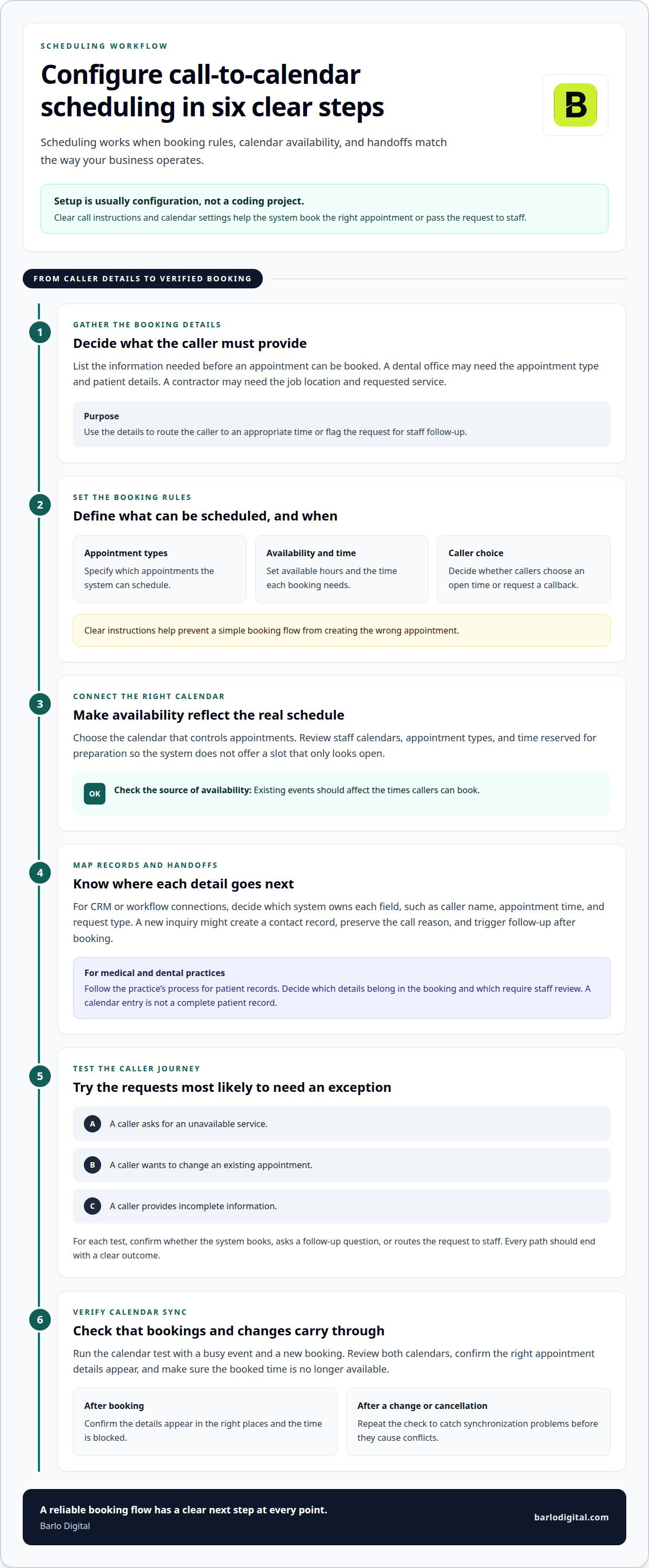
Start by listing what a caller must provide before booking. A dental office might need the appointment type and patient details; a contractor might need the job location and requested service. Those details help route the caller to an appropriate time or flag when staff need to follow up.
Next, define the booking rules. Set which appointment types can be scheduled, available hours, and the time each booking needs. Specify whether callers can choose an open time or should request a callback. Clear instructions prevent a simple booking flow from creating the wrong appointment.
Test the full call path with examples. Try a caller asking for an unavailable service, changing an existing appointment, or providing incomplete information. Note whether the system books, asks a follow-up question, or routes the request to staff. A successful test ends with a clear outcome, not an ambiguous message.
Calendar Integrations
A calendar connection should reflect actual availability, not just display time slots that look open. Choose the calendar that controls appointments, then review how new bookings appear and how existing events affect availability. Check the real workflow, including staff calendars, appointment types, and time reserved for preparation.
Test common changes before relying on the connection. Add a busy event, create a booking, then review both calendars. Confirm that the right appointment details appear and the booked time is no longer shown as available. Repeat the test after changing or canceling a booking. This can reveal synchronization problems before they cause scheduling conflicts.
Practice-management systems may contain patient records and appointment details. A connected scheduling workflow should follow the practice’s established process for creating or updating those records. In a medical or dental office, decide which details belong in the booking and which need staff review. A calendar entry is not a complete patient record.
CRM and workflow connections add another handoff. For example, a new inquiry might create a contact record, preserve the call reason, and trigger follow-up after booking. Map which system owns each field, such as the caller’s name, appointment time, and request type. Then test one inquiry from the call through the calendar and follow-up.
For teams that need more than calendar entry, B2B appointment-setting workflows can support a separate process for scheduling qualified meetings.
Pricing, call allowances, and overage charges
The bill may include a service fee, an included call allowance, and charges for usage beyond that allowance. Compare the published service price with its allowance and billing unit. A plan’s fit depends on call volume, call length, setup needs, and routing complexity. Review those terms together, not as separate headline features.
Read the billing definition before comparing plans. One provider may count each answered call, while another measures talk time or a different usage unit. Check how transfers, abandoned calls, repeat callers, and test calls affect usage. These terms determine whether the stated allowance reflects your actual phone traffic.
Overage charges apply when usage exceeds a plan’s included limit. Estimate demand from your call records, including busy periods and seasonal spikes. Compare that pattern with the allowance, then identify how additional usage is billed. A plan that looks economical at low usage may cost more when actual calls exceed the included amount.
Call analytics turn usage into operational evidence. Review answered calls, missed transfers, call duration, and outcomes such as booked appointments or callback requests. Separate sales inquiries from existing-customer questions. That split shows whether the system is handling valuable leads or using capacity on routine requests. Compare the measures with the billing period to understand where usage comes from.
Call summaries and history help staff follow up on conversations. A useful record captures the caller’s name, reason for calling, requested next step, and transfer outcome. For example, a roofing company can distinguish an estimate request from a question about an active project. Assign an owner to each follow-up category so recorded calls don’t go unaddressed.
How well a system understands callers depends on audio quality, wording, background noise, and the instructions it receives. Clear questions and defined response paths help classify requests. Test unclear names and questions outside approved answers. Then assess whether the system captures caller intent or routes uncertainty to staff.
Voice selection affects how a call sounds, while scenarios shape responses. If voice options are available, test the selected voice with your actual script. Build distinct scenarios for a new inquiry, a reschedule, and an urgent request. Keep each flow direct, and define the handoff for requests the system should not handle.
Urgent-call routing needs a clear trigger and destination. Define which situations require immediate transfer, who receives the call, and what happens if that person can’t answer. Test a routine request and an urgent one. Review the call history afterward to see whether the AI receptionist followed the intended route and recorded the next action.
AI receptionist use cases by industry
The main risks are misunderstood requests, incorrect routing, and workflows without human escalation. Limit the system to clear, repeatable tasks, then test unusual calls before relying on it for complex decisions.
Law firms
A law firm can use call handling to capture a caller’s name, contact details, and broad reason for calling. For example, the system can distinguish a prospective client inquiry from a current client asking about a case. It should not treat initial intake as legal advice.
Set a defined handoff for urgent deadlines, conflicts questions, or callers seeking legal guidance. Give staff the call summary and requested next step. The firm can then decide who reviews the inquiry and how it enters the intake process.
Managed service providers
An MSP can sort calls about new IT support, existing service requests, and billing questions. A new prospect asking about network support needs a different route from an employee reporting an outage. Define those call paths before writing the answering instructions.
For a support request, collect the caller’s organization, contact information, and a plain-language description. Route technical incidents through the designated support process. Keep sales inquiries separate so a potential contract doesn’t disappear into a service queue.
Staffing agencies
A staffing agency can use call flows to distinguish employers seeking candidates from job seekers asking about openings. The system can capture the role, location, and caller’s preferred follow-up method. Those details help a recruiter identify the right next step.
Define separate prompts for employers and applicants. An employer, for example, may need to describe a hiring need, while a candidate may want to discuss an application. Route each conversation to the appropriate team instead of sending both to one general inbox.
Commercial insurance agencies
An insurance agency can sort calls from current policyholders, prospective business clients, and people requesting certificates. Each request needs its own destination and intake details. A new commercial inquiry, for instance, should capture the business type and requested coverage discussion.
Keep the system focused on administrative intake. Route coverage questions, claims issues, and policy changes to staff who can review the caller’s situation. Use clear prompts to gather contact details without presenting a scripted response as a coverage decision.
Where automation should stop
Use a human handoff when a caller’s request is unclear, sensitive, or outside the approved call flow. Someone who changes topics midway through a conversation may need staff, not another repeated prompt. Review sample calls for incorrect summaries, missed context, and routing errors.
Before launch, test a routine inquiry and an exception for each department. Check whether the system captured the right details, selected the intended destination, and created a useful follow-up task. This exposes unclear instructions before they affect a real prospect or customer.
What features do AI receptionist services offer?
Feature lists often blur the difference between a function and a working process. Assess each feature against a real caller task, the information it captures, and the next action it triggers. A feature matters only when it supports a defined business outcome.
Start with call-flow configuration. This determines what the system asks, which answers it can give, and where it sends unresolved requests. For example, a home-service business could distinguish a new estimate inquiry from a question about an existing job. Each path needs its own intake details and destination.
Question handling has limits. The BBC reported that a virtual receptionist could answer only a limited number of questions. Build approved responses around routine requests, such as business hours or appointment instructions. Set a clear handoff for questions about an unfamiliar service, a sensitive issue, or a decision requiring staff judgment.
Call records can support follow-up when they preserve useful details. Check whether a record captures the caller’s name, contact information, request, and intended next step. Then confirm that staff can identify who owns the follow-up. A summary that says only “customer called” does little to move a lead forward.
Routing options should reflect how your team works. A new sales inquiry may need a different destination from a billing question or urgent service issue. Define each route, its trigger, and the fallback if the intended person can’t take the call. Test each path with sample calls before relying on it.
Some services offer voice choices or configurable call scenarios. Treat these as operational settings, not decoration. Select a voice that suits your callers, then listen to complete calls using your actual wording. Check whether the system asks questions clearly, handles interruptions, and keeps the conversation on track.
Look for reporting that connects call activity to outcomes. Useful measures may include completed transfers, captured inquiries, and appointments requested. Compare call records with staff follow-up to find gaps. If callers repeatedly ask questions the system can’t answer, update the approved responses or route that topic directly to a person.
Before selecting features, write down your common call types and the action each should produce. Use that map to test one routine inquiry and one exception. For businesses refining call capture and follow-up, our call-answering and lead-response approach connects those steps to the next business action.
Barlo Digital: Ecommerce tracking and measurement audit
Barlo Digital’s AI receptionist and lead response service helps businesses route inbound inquiries into a clear follow-up process. It connects phone and form inquiries with the next action your team needs to take, rather than leaving new leads in disconnected channels.
If missed or delayed lead response is the gap you need to address, explore our AI receptionist and lead-response service to see how it fits your business.
Make the next step measurable
Choose the call outcome your team needs to improve, then decide who owns the follow-up. That gives you a clear basis for assessing whether an AI receptionist fits your inquiry-handling process.
Barlo Digital’s AI receptionist and lead response service helps businesses address inbound call handling and lead follow-up. If that is the gap you need to solve, review our AI receptionist and lead-response service and consider how it fits your workflow.
A defined next step makes the decision practical. Start with the inquiry process you want to improve.
Frequently Asked Questions
Do I need technical expertise to set it up?
No. Define the calls the system should handle, the information it should collect, and the situations that need staff. Start with sample caller scenarios and clear instructions for each outcome. Your phone administrator may need to configure forwarding or access, but the business rules should come from the people who handle calls.
Can I keep my existing phone number?
Often, yes. Call forwarding can direct calls from your current business number to the answering system while keeping your public number unchanged. The method depends on your phone provider and existing setup. Before switching, map what happens to extensions, voicemail, and calls that already route to different teams. Test each path using your existing number.
How do I monitor performance?
Review call records alongside outcomes your team cares about, such as qualified inquiries, completed follow-ups, or booked appointments. Check whether each record captures the caller’s request and next action. Then compare the records with your staff’s actual follow-up. If inquiries are recorded but not acted on, assign an owner and adjust the handoff process.
Is the AI receptionist available 24/7?
Barlo Digital’s AI receptionist answers every call, and every call and form is answered in seconds, day and night. Every response is logged. This gives businesses a record to review when staff return to an inquiry. Set clear instructions for time-sensitive requests, including who should receive them and what the system should do if that person can’t respond.
What is an AI receptionist and how does it work?
An AI receptionist is a phone-answering system that uses configured instructions to respond to callers and capture information. It can handle defined call scenarios, such as recording a service request or directing an inquiry. Barlo Digital’s system also answers web forms, with every response logged. The business sets the call-handling rules and follow-up process.
How much does an AI receptionist cost in the United States?
Costs depend on setup, call volume, included usage, and charges for exceeding an allowance. Some providers separate setup from recurring service, while others bill based on usage. Compare the billing unit, what counts toward an allowance, and overage terms. Barlo Digital publishes prices on every service page, so review the relevant page for current pricing.
How do you set up an AI receptionist for a business?
Start by sorting calls into practical categories, such as new sales inquiries, existing customer requests, and urgent issues. List the details each caller should provide, then define the destination or follow-up for each category. Configure the phone flow and any connected workflow. Test routine calls and exceptions, then review records for unclear instructions or missed handoffs.
Can AI receptionists integrate with phone systems, calendars, and CRM software?
They can be configured to work with phone routing, calendars, or customer records when the relevant systems support the required connection. Define which system controls availability and which record should receive caller details. For example, a new inquiry might need a call record and a follow-up task. Test the complete path, including transfers, booking changes, and failed handoffs.

Article by
Carlos Benavides
Carlos Benavides founded Barlo Digital and is its Director of Paid Media and Performance. He has fifteen years in direct-response marketing, more than $50M in lifetime ad spend, and a B.S. in Computer Science, which is why tracking at Barlo Digital is built by hand. Barlo Digital is a director-led paid media and search agency serving US ecommerce brands, home-service companies and practices.


