

Automation doesn’t fix a broken handoff. It makes the break happen faster. An automated lead follow up system can respond consistently, but irrelevant messages or unclear ownership can still leave opportunities unattended.
Inbound leads need a timely response, useful context, and a clear route to the right person. When follow-up depends on individual habits, it becomes harder to manage each step and see what happened to an inquiry.
This guide shows you how to evaluate a system against the way your sales operation works. You’ll learn what to assess in the workflow, how to define human handoffs, what activity to measure, and where automation should stop. The aim isn’t to automate every interaction. It’s to keep leads moving from first contact to meaningful sales follow-up.
Before you choose a tool or build a workflow, focus on the decisions that separate useful automation from extra complexity.
Key Takeaways
- Define ownership and recorded outcomes before automating. Missing assignments and incomplete records can break follow-up at different points.
- Map the lead journey from capture through routing, response, qualification, and the next recorded action.
- Compare an automated lead follow up system by workflow fit, channel support, routing, visibility, and measurement.
- Document lead sources, current steps, exceptions, and handoffs before testing one workflow from start to finish.
- Use an AI receptionist and custom automation to support your operation while keeping human ownership clear.
Why an Automated Lead Follow-Up System Breaks Down Without Clear Ownership
An automated lead follow up system is more than a series of emails or texts. It connects the event that starts follow-up with the messages or tasks that come next, the person responsible for action, and the outcome recorded afterward. If any link is missing, activity can happen without anyone knowing whether the inquiry reached sales or what should happen next.
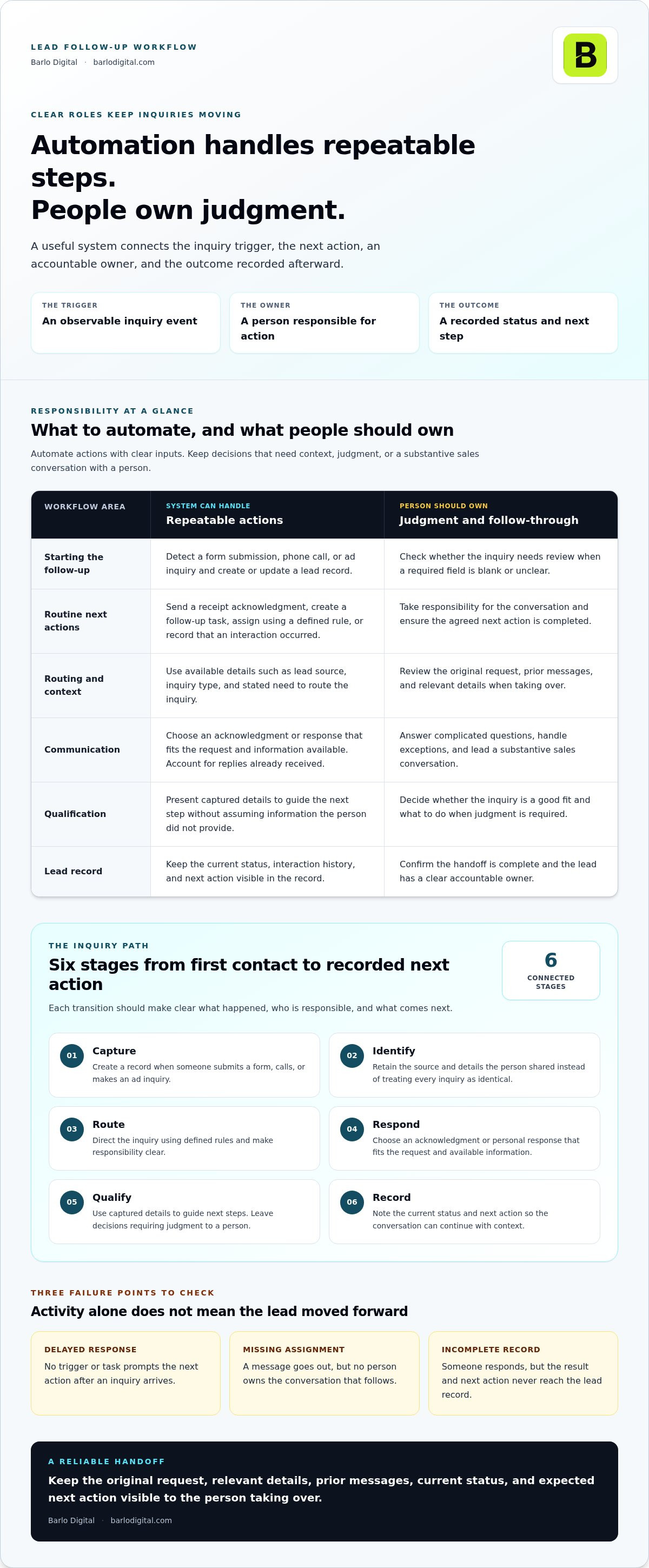
In practical terms, the system should connect inquiry triggers, messages, accountable owners, and recorded outcomes in one traceable workflow. That distinction matters because automation can create the appearance of action while a lead remains unassigned. Repeatable communication helps only when ownership and follow-through are clear, too.
- Delayed response: An inquiry arrives, but no trigger or task prompts the next action.
- Missing assignment: A message goes out, but no person owns the conversation that follows.
- Incomplete record: Someone responds, but the result and next action never make it into the lead record.
These are different failure points. A system can send an acknowledgment correctly and still fail to route the lead. It can assign an owner but leave sales without the original question or its source. Effective AI automation for lead workflows connects these operational steps instead of simply increasing message volume.
Where inbound leads get lost before sales responds
Trace each inquiry from its entry point to the first accountable owner. A form submission, phone call, or ad inquiry should create or update a record, retain useful context, and identify who is expected to act. If routing depends on information the form never captures, the lead may land in a general queue without a clear owner.
Duplicates create another point of failure. A prospect might submit a form and call later. If those interactions create separate records, one salesperson may see the form while another handles the call, and neither sees the full history. For example, someone asks about a specific service in a form, then calls to clarify. The owner needs both interactions in one usable view, not competing records with different statuses.
What automation should handle, and what people should own
Automate repeatable actions with clear inputs: send a receipt acknowledgment, create a follow-up task, assign a lead using a defined rule, or record that an interaction occurred. These steps reduce reliance on memory. They don’t determine whether an inquiry is a good fit or how to answer a complicated request.
People should own decisions that require judgment. A prospect may raise an exception, ask a question outside a standard response, or be ready for a substantive sales conversation. The workflow should show the right owner the relevant context, then leave that person accountable for deciding what to do. Before building, document who handles each lead type, what information gets passed along, and what marks a handoff as complete. Automation supports sales accountability. It doesn’t replace it.
How an Automated Lead Follow-Up System Moves an Inquiry Toward Sales
A useful lead journey has six stages: capture the inquiry, identify its context, route it, respond, qualify it, and record the next action. An automated lead follow up system should make the transition between each stage clear. Sending a message is one activity in the process. The workflow also needs to show whether the inquiry reached the appropriate next step.
A trigger identifies the event, an owner takes responsibility, and a defined next action moves the inquiry forward. Build rules around observable events and information the lead actually provided. A form submission, for example, can start a workflow. The source, inquiry type, and stated need can help determine the relevant route or response.
- Capture: Create a record when someone submits a form, calls, or makes an ad inquiry.
- Identify: Retain the source and details the person shared instead of treating every inquiry as identical.
- Route: Direct the inquiry using defined rules and make responsibility clear.
- Respond: Choose an acknowledgment or personal response that fits the request and the information available.
- Qualify: Use the captured details to guide next steps, while leaving decisions that require judgment to a person.
- Record: Note the current status and next action so the conversation can continue with context.
Use channels for different purposes rather than repeating the same message in different formats. Email can provide a fuller acknowledgment or information relevant to the request. Text can support a concise exchange when it suits the inquiry and the company’s process. A call can help clarify details or support a direct sales conversation. The workflow should account for what has already happened. If someone replies, continuing a preset message sequence without recognizing the reply can make follow-up feel disconnected.
Choose triggers and routing rules that reflect real lead intent
Use inputs that are both observable and useful, such as lead source, inquiry type, and stated need. A request for an estimate may need a different route from a general question. Define what starts each path, who owns it, and what action follows. If a required field is blank or unclear, don’t send a response that assumes details the person never supplied. Route the inquiry for review instead.
Make the human handoff visible in the lead record
When a person takes over, they need the original request, relevant details, prior messages, current status, and expected next action. A usable activity history keeps the conversation coherent and helps prevent disconnected outreach. Record the handoff and outcome where the team can review them. Our AI receptionist and lead response workflows support inbound engagement, qualification, and follow-up while keeping the human sales process in view.
How to Compare Automated Lead Follow-Up Systems Before You Choose
A feature count won’t tell you whether a system fits your sales operation. Compare how it handles an inquiry from entry to the next sales action: what context it captures, who owns the work, how the team reviews activity, and what gets measured. The system should support your lead sources and process, not force staff through extra steps just to use the software.
Assess each option with the same realistic scenario. For example, trace a form inquiry from its source through the sales team’s actual workflow. Look for gaps between what the system records and what the person responsible needs to act. A feature list can’t reveal those gaps. A workflow test can.
| Compare | What to assess |
|---|---|
| Workflow fit | Can it support your existing sales steps without creating unnecessary work? |
| Channel support | Does it handle the channels your leads use, with communication suited to each stage? |
| Routing | Can assignment rules use information your team actually collects? |
| Visibility | Can the team review ownership, status, and activity without reconstructing the history? |
| Measurement | Can you assess completed sales actions and unresolved work, not only messages sent? |
Evaluate system fit beyond the feature checklist
Test a representative path for each important lead source. Check whether the system preserves inquiry details, supports assignment, and records the next action somewhere the team can find it. Then consider setup and upkeep. Routing rules and message paths need an owner who can maintain them as the sales process changes. A capability that takes ongoing work but solves no defined problem is overhead, not a good fit.
Separate essentials from extras. For each feature, name the specific breakdown it should prevent or the task it should improve. If the team can’t identify that purpose, leave it out of the initial design. A focused first configuration makes it easier to see whether the system supports the operation or simply adds settings to manage. Our AI automation for lead workflows is designed around custom workflow needs rather than feature volume.
Decide what should stay human-led
Automation feels impersonal when it ignores a request, repeats a message after someone replies, or treats an exception like a routine inquiry. Test messages against real situations and confirm how replies become visible to the team. Identify which questions need a person and define what happens when they arise. A clear escalation path is more useful than expecting sales to run without human attention.
How to Prepare Your Lead Follow-Up Workflow for Automation
Automation exposes the process you already have. It won’t resolve conflicting ownership, missing information, or workarounds only one employee understands. Before configuring a sequence, document how an inquiry moves from arrival to disposition. Then choose one defined workflow to test. Keep the first build narrow enough for your team to inspect each step and identify where the process fails.
Map the current process before configuring a sequence
Write down every lead source, the response steps used today, the owner at each stage, exceptions, and handoff points. Include manual workarounds, such as copying form details into another record or forwarding a call summary by email. These workarounds may point to missing fields or unclear responsibility. Fix the process on paper before turning its gaps into automated rules.
Set a baseline using records you already have. Note how many inquiries have an assigned owner, a completed follow-up action, or an unresolved status. If the information is incomplete, record that limitation instead of treating unknown outcomes as successes. These operational signals give you a comparison point and help reveal whether the main problem is intake, assignment, follow-through, or recordkeeping.
- Sources: List forms, calls, ads, and other inbound paths included in the workflow.
- Owners: Name the role responsible for each action and handoff.
- Exceptions: Note incomplete details, duplicate inquiries, and requests that need review.
- Outcomes: Define what counts as assigned, action completed, or still unresolved.
Test the workflow and inspect its tracking
Test representative paths before relying on the process. Use a complete inquiry, a missing-field case, and a routing exception. Check whether each starts the intended action, reaches the right owner, and leaves a clear record of the result. Review the message for relevance, then confirm that a reply or exception doesn’t keep the lead moving through an outdated sequence.
Inspect the lead history as the salesperson will see it. The source, inquiry details, messages, assignment, status, and next action should tell a coherent story. If a call happens outside the workflow, decide how its outcome will be recorded. When source attribution is part of the problem, call and lead tracking can connect calls and inquiries with the records used to review follow-up.
After testing, compare recorded outcomes with your baseline. Look for assigned leads without completed actions, unresolved inquiries without a next step, and outcomes that remain unknown. Correct one failure at a time, then test again. Our AI automation services support custom workflow design for inbound engagement, qualification, and follow-up.
How Barlo Digital Supports Automated Lead Follow-Up and Lead Response
A reliable automated lead follow up system is built around what happens after an inquiry arrives: how it is handled, what information is captured, who takes over, and how the outcome is tracked. Barlo Digital provides AI receptionist lead response and custom AI automation to support inbound engagement, qualification, and follow-up as connected business workflows. The aim is not to automate every conversation. It is to make the work around each conversation more visible and consistent.
Our AI receptionist helps businesses handle calls alongside inquiries from other channels, including when staff are occupied or unavailable to respond directly. It supports inbound response and the flow of information into the business’s follow-up process. A call response is an entry point, not a completed sale. Human sales judgment, ownership, and the next action still matter.
When an AI receptionist or lead response service fits
Consider where inquiries enter, what information your team needs to collect, and what should happen after an initial response. If the process includes calls, forms, and ad inquiries, define how context from each source should reach the person responsible for follow-up. Keep the role of automated response specific: support initial engagement and move the inquiry into the team’s established process, rather than treating a response as a completed sale.
Qualification needs the same discipline. Automation can support routine questions or information gathering, while complex requests, exceptions, and substantive sales discussions may need a person. Make that distinction clear in the workflow. Staff also need a practical way to see what has happened and what action remains, without treating automation as a replacement for a salesperson or a guarantee of a commercial outcome.
What to expect from Barlo Digital’s operating approach
We build around the business process, not a generic sequence. Our work connects inbound lead engagement with qualification, follow-up, and call or lead tracking so the business can examine more than whether a message was sent. The right measures depend on the workflow, but the operating questions stay concrete: what happened to the inquiry, who owns the next step, and is the outcome recorded?
Our custom AI automation supports workflow design for inbound lead engagement, qualification, and follow-up. Delivery is director-led and completed at senior level, with no account-manager layer and no handoff to junior staff. Responsibility stays close to the work being designed.
Make the Next Step a Practical One
Improve the workflow before adding another layer of complexity. Choose one point where inquiries stall, define what a useful outcome looks like, and use that as the basis for your next decision. A focused change gives your team something concrete to assess and makes it easier to see whether the process is working.
Start with the workflow your team needs to make more dependable. Define the lead source, the person responsible, and the next action, then assess where automation can make those steps clearer and more consistent.
To discuss a practical plan for your inbound calls and lead follow-up, explore Barlo Digital’s AI receptionist and lead response service.
Frequently Asked Questions
Can an automated lead follow-up system work with a CRM we already use?
Yes, if the workflow can transfer the lead details and activity your team needs. Before choosing a system, check which fields are created or updated, where ownership is recorded, and how follow-up activity appears. For example, submit a test inquiry and confirm that the source and requested service remain visible after the record changes. Don’t assume a connection is native or complete. Requirements depend on the tools and their configuration.
What happens when someone submits the same lead form more than once?
The workflow should have an explicit rule for repeat submissions. It might update an existing record, add a new activity, or send the case for review, depending on how your team handles returning inquiries. Without that rule, duplicate records can split the history or restart messages without context. Test with the same contact details and confirm the result is clear to the person who will follow up.
Can automated follow-up send messages outside business hours?
It can be configured to handle inquiries received outside the team’s working hours, but decide what the response should accomplish. For instance, it might acknowledge receipt and explain when the team will review the inquiry. The process should match your operating hours and customer expectations. Don’t present an automated acknowledgment as a completed conversation or as a substitute for a person’s response when one is needed.
What happens if a lead replies while an automated sequence is running?
Set a rule for replies before launching the sequence. Depending on the process, a response could pause scheduled messages, change the lead’s status, or create a task for a salesperson. Test a reply that asks a new question, not just a simple confirmation. Review what the team sees and whether additional outreach is still appropriate. A preset message that ignores a live reply can make the interaction feel disconnected.
Should every lead receive the same automated follow-up sequence?
No. Use different paths only when a meaningful difference changes the next useful action. Someone requesting a specific service may need different information from someone asking a general question. Start with a small set of clear cases, such as distinct inquiry types, and check whether the messages fit each one. If staff can’t explain why a path exists or maintain it reliably, simplify the rules instead of adding more branches.
What should happen when a lead asks to stop receiving messages?
Record the request and define how the team prevents further outreach that shouldn’t continue. Specify who reviews the request, how it’s reflected in the lead record, and which communication channels it affects. Don’t rely on a default setting without testing what happens to active follow-up. Requirements can vary by channel and situation, so consult authoritative government guidance or qualified counsel for obligations that apply to your business.

Article by
Carlos Benavides
Carlos Benavides founded Barlo Digital and is its Director of Paid Media and Performance. He has fifteen years in direct-response marketing, more than $50M in lifetime ad spend, and a B.S. in Computer Science, which is why tracking at Barlo Digital is built by hand. Barlo Digital is a director-led paid media and search agency serving US ecommerce brands, home-service companies and practices.


