

Automation doesn’t fix a broken follow-up process. It makes the gaps happen faster. An automated lead follow up system can respond consistently, but only if it knows what happens next, who owns the handoff, and how the team will measure progress.
If inbound leads wait while staff rely on memory and manual reminders, the problem isn’t solved by sending more messages. Automation can miss context, send irrelevant follow-ups, or keep contacting someone who needs a salesperson instead. The system has to fit how your sales operation works, including how leads are captured, assigned, and moved to a next action.
This guide shows you how to evaluate an automated lead follow-up system by its workflow, qualification and routing steps, human handoffs, measurement, and fit with your team. You’ll see what to assess before choosing a tool or building custom automation, and how connected lead response and tracking support a clearer view of sales activity. At Barlo Digital, we provide AI receptionist and lead response systems as part of that operational picture.
Key Takeaways
- Define ownership and recorded outcomes before automating, so no inquiry sits between teams or steps.
- Map the lead journey from capture through routing and qualification to a clearly recorded next action.
- Compare an automated lead follow up system by workflow fit, channel support, routing, visibility, and measurement.
- Document lead sources, owners, exceptions, and handoffs before testing one defined workflow.
- Assess whether AI lead response and custom automation can support your process without replacing the human handoffs it requires.
Why an Automated Lead Follow-Up System Breaks Down Without Clear Ownership
An automated lead follow up system is more than a sequence of messages. It connects lead triggers, communications, accountable owners, and recorded outcomes so each inquiry has a defined path forward. If any connection breaks, automation can send a message while the actual sales task remains unassigned. A salesperson might also follow up without knowing what the lead already received.
Failures happen at different points. A delayed response is a timing problem. A missing assignment is an ownership problem. An incomplete record is a visibility problem. Fixing one does not fix the others. The system should make each issue visible, not hide it behind a sent-message log.
Automation can coordinate steps, but only within the rules and information it has been given. Without clear owners and defined outcomes, adding automation can multiply confusion instead of resolving it.
Where inbound leads get lost before sales responds
Trace each inquiry from its source to the first person responsible for acting on it. A form submission, phone call, or ad inquiry needs to become a usable record, reach an owner, and show what action is pending. Messaging alone can’t make up for incomplete lead information or unclear responsibility.
For example, someone submits a form asking about a service. If the form creates a record in one system while a salesperson checks another, the inquiry can sit unseen. If a call and form submission create duplicate records, two employees may contact the same person, or each may assume the other has taken responsibility. Adding a reminder won’t resolve either issue.
Set one accountable owner or queue for each lead type, and define what happens when routing information is missing. Record the source, assignment, attempted contact, and next action in the same place the sales team uses to manage work. An AI receptionist and lead response system can support that handoff, but the business still needs to define who owns the inquiry and what happens next.
What automation should handle, and what people should own
Automation suits repeatable actions with clear conditions. It can acknowledge an inquiry, create a task, route a lead using defined information, or record that a step occurred. These actions reduce dependence on someone remembering every routine task. They don’t establish whether a lead is a good fit or decide how to handle an unusual request.
People should own decisions that depend on context. A prospect may ask a complex question, describe an exception, or reveal a need that doesn’t match the standard route. A salesperson must interpret that information, answer appropriately, and decide the next move. Automating a judgment call from incomplete data risks sending irrelevant messages or directing the inquiry down the wrong path.
Make the boundary explicit. Define which events trigger an automated action, which conditions send a lead to a person, and who takes responsibility after that handoff. Then record whether the person acted and what happened next. Automation supports sales accountability. It doesn’t replace it.
How an Automated Lead Follow-Up System Moves an Inquiry Toward Sales
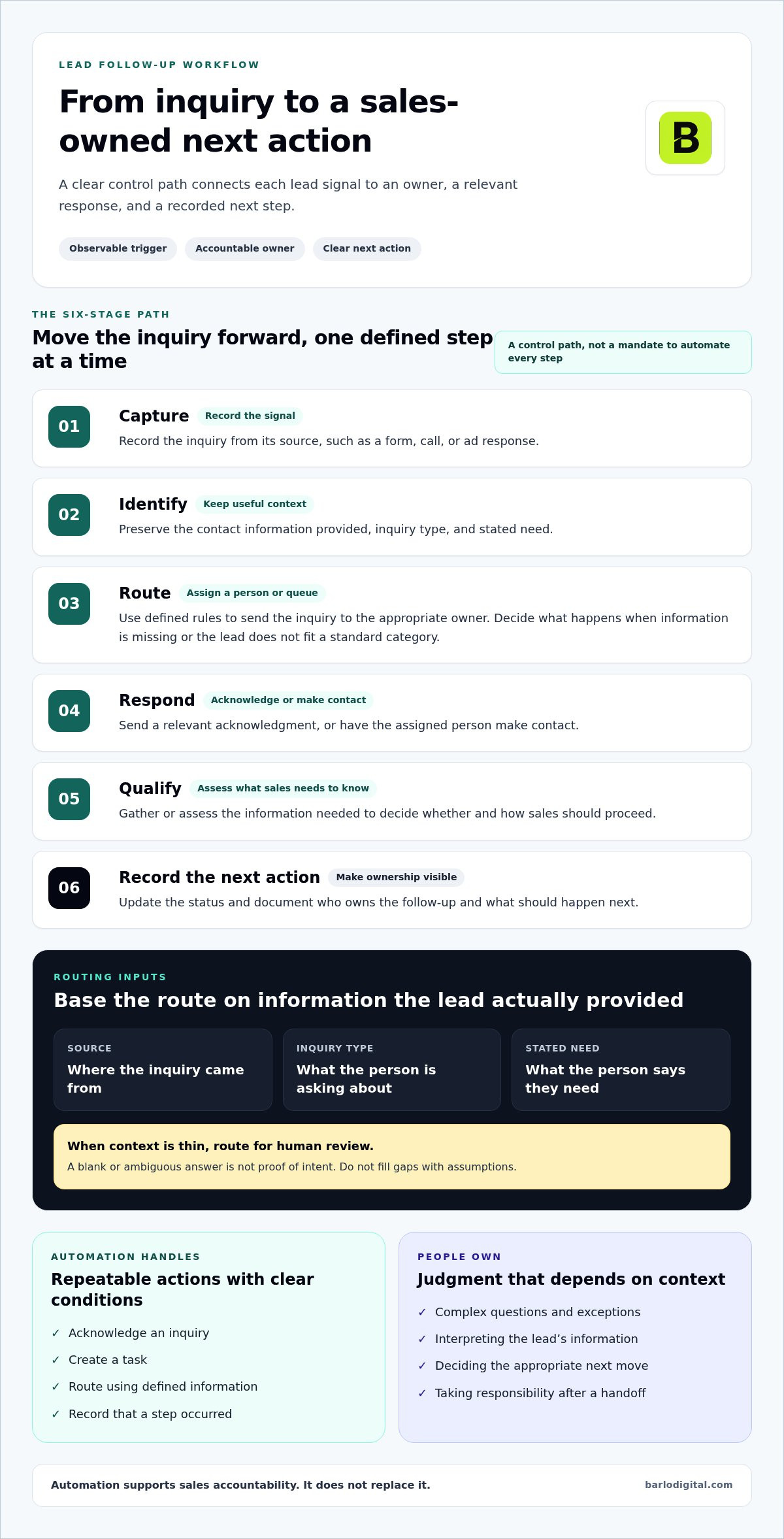
A useful automated lead follow up system moves an inquiry through defined steps, from its first recorded signal to a sales-owned next action. Each transition needs a reason. A trigger should identify an observable event, assign an owner, and create a clear next action. Without all three, a workflow can send messages without moving the lead toward a decision.
- Capture: Record the inquiry from its source, such as a form, call, or ad response.
- Identify: Preserve useful details, including the contact information provided, inquiry type, and stated need.
- Route: Assign the inquiry to the appropriate person or queue using defined rules.
- Respond: Send a relevant acknowledgment or have the assigned person make contact.
- Qualify: Gather or assess information needed to decide whether and how sales should proceed.
- Record the next action: Update the status and document who owns the follow-up and what should happen next.
This sequence is a control path, not a mandate to automate every step. Set triggers around events the system can observe, such as a new inquiry or a recorded status change. Use the information available to choose a sensible route. A blank or ambiguous answer shouldn’t be treated as proof of intent.
Choose triggers and routing rules that reflect real lead intent
Useful routing inputs can include lead source, inquiry type, and the need the person stated. For example, a request for an estimate may belong with a different sales owner than a general question. Define what happens when a field is missing, two rules seem to apply, or the inquiry doesn’t fit a standard category. Every trigger needs an accountable owner and a next step.
Bad inputs create bad actions. If an ad form labels every submission as “ready to buy,” the system may send an overly direct message to someone who only requested information. Tie automated responses to facts the lead actually provided. When context is thin, route the inquiry for human review rather than filling in the gaps with assumptions.
Make the human handoff visible in the lead record
A salesperson taking over should be able to see where the inquiry came from, what the person asked, which messages or calls have already occurred, and what the system assigned as the next action. That context helps the salesperson continue the conversation instead of restarting it. A clear status, such as awaiting contact or sales review, also shows who currently owns the work.
Use one agreed record of activity where the team can see the latest status and responsibility. If the lead changes hands, record that transition. Email, text, and calls can each serve a purpose: an acknowledgment can confirm receipt, a text can support a brief follow-up, and a call can handle a discussion that needs conversation. Set contact rules around the lead’s actual stage and prior activity, not a blind sequence that repeats the same request.
Barlo Digital’s custom AI automation for lead workflows can support defined routing, qualification, and follow-up steps while keeping ownership and human review in view.
How to Compare Automated Lead Follow-Up Systems Before You Choose
A feature checklist can make a weak fit look capable. Compare each option against the same real inquiry path: where a lead comes from, what information arrives, who needs to act, and what the team must be able to review afterward. An automated lead follow up system should support your sales process as it works now, not force staff into a second process just to keep the automation running.
Workflow fit: Can the system represent your actual lead stages and exceptions, or does it require awkward workarounds?
Channel support: Does it support the email, text, and call steps your process uses, with a way to avoid repeating contact without regard to prior activity?
Routing: Can inquiries reach the right owner based on source, type, or stated need? What happens when the information is incomplete?
Visibility: Can sales see the lead’s status, prior activity, and assigned next action without piecing together separate message histories?
Measurement: Can your team review response activity, handoffs, and meaningful sales actions, rather than counting messages sent?
Use the matrix to compare how each system handles your current lead sources and sales steps. Test a form inquiry, a call, and an inquiry with missing details if those cases occur in your operation. Follow each through the workflow. Note where context disappears, ownership becomes unclear, or a person has to update information elsewhere.
Evaluate system fit beyond the feature checklist
Ask what the team must configure, review, and maintain after launch. A capability has little value if no one owns its rules or checks whether the resulting records are useful. Compare how each option captures lead context, assigns responsibility, and records the next action. Then verify that authorized staff can review activity in a consistent place. A collection of features is not a working process.
Separate requirements from extras. A new dashboard or a larger set of message templates won’t solve a routing failure unless it addresses that failure directly. Write down the operational problem behind each requested feature. If the problem has no clear owner or test, the feature may add upkeep without improving the workflow.
Decide what should stay human-led
Automation can feel impersonal when a message ignores what a person asked, arrives after the conversation has moved on, or repeats a request already answered. Evaluate relevance, timing, and escalation together. A suitable system should let your team define when a reply, complex question, or exception needs human attention, and show that status clearly to the person taking over.
Don’t treat “hands-free selling” as the measure of fit. Sales conversations involve interpretation. A person may need to clarify a need, handle an unusual request, or decide whether the next step makes sense. Barlo Digital’s custom AI automation for lead workflows can be designed around defined business steps, with human review where judgment matters.
How to Prepare Your Lead Follow-Up Workflow for Automation
Automation exposes the process you already have. If lead sources are inconsistently recorded, ownership is unclear, or staff rely on undocumented workarounds, those defects will enter the new workflow too. Prepare the operating rules first. Then automate a narrow process you can inspect from inquiry through outcome.
Map the current process before configuring a sequence
Document what happens from the moment an inquiry arrives until it is closed, disqualified, or moved to another step. Include manual actions, not just the steps people are meant to follow. Note who handles each lead source, which details sales needs, what exceptions occur, and where responsibility changes hands.
Use the map to identify gaps before configuring messages or triggers. If a form omits a detail the team needs, decide whether to collect it, route the lead for review, or proceed without it. If staff use a workaround, record why. An automated rule built around an unexplained workaround can preserve a broken process rather than fix it.
Establish a baseline from records you already have. Look at which inquiries were assigned, which follow-up actions were completed, and which remain unresolved. If the records don’t support a reliable count, note that as a measurement gap. Don’t create a benchmark from incomplete data.
Test the workflow and inspect its tracking
Start with one defined path, such as a particular form or call inquiry. Test a typical submission, a missing field, and a case that should go to a different owner. For each test, verify the input is captured accurately, the intended message is appropriate, routing reaches the expected person or queue, and the resulting status and next action are recorded.
Inspect the full activity history, not just whether a message was sent. Confirm that sales can see the inquiry source, prior contact, assigned owner, and current next step in the record they use. Check that an exception or reply is visible to the person expected to act on it. If those details are scattered across inboxes or notes, the workflow still has a handoff problem.
Review the pilot using operational signals: leads assigned, actions completed, and inquiries still unresolved. Compare those counts with the baseline where the records allow it. Also check lead source attribution. Clear call and lead tracking can help the team connect inquiries with their sources and follow-up activity.
Only expand the workflow after the team can explain what each rule does, who owns exceptions, and where outcomes are recorded. Barlo Digital’s custom AI automation can support workflow design around those defined steps. Start by mapping the process you want to automate.
How Barlo Digital Supports Automated Lead Follow-Up and Lead Response
Lead response works only when the pieces connect. An inquiry needs a relevant response, a clear route to qualification, an accountable person for the next sales step, and a record the team can use to review what happened. Barlo Digital provides AI receptionist lead response and custom AI automation to support these workflows. We focus on the operating process, not automation for its own sake.
When an AI receptionist or lead response service fits
An AI receptionist can support businesses that receive inbound calls and other inquiries but have gaps in staffed coverage. A person may call while the team is occupied or submit an inquiry when staff aren’t available to respond. Our lead response systems can engage those inquiries and direct them toward a defined next step. The workflow should reflect how your business handles different inquiry types.
Engagement is not the same as a completed sales conversation. A response may acknowledge a request or support initial qualification, but a person may still need to answer a complex question, assess fit, discuss options, or decide what to do next. Treat automation as part of the response process, not as a substitute for sales ownership.
What to expect from Barlo Digital’s operating approach
We build custom AI automations around inbound lead engagement, qualification, and follow-up. That means considering how inquiries enter the business, what information is useful, where the next step belongs, and how activity should be recorded. Call and lead tracking can add visibility into inquiry sources and follow-up activity, giving the business more context for reviewing its process.
The system should support the team’s defined workflow. It shouldn’t send a generic message simply because a trigger fired. Rules need to account for the information available, the lead’s stage, and the point where a person should take over. Teams also need to see whether inquiries were routed, actions were completed, and unresolved items remain.
Delivery at Barlo Digital is director-led. A director runs every account, the work is handled at senior level, and there is no account-manager layer. That keeps responsibility for the work close to the people shaping the workflow. It does not guarantee a particular response or sales outcome. Results still depend on the business process, lead context, and human actions after the handoff.
If your current process has gaps between inquiry, response, and sales action, define those points before adding more messages. Then assess where AI receptionist lead response, custom automation, and tracking can support the actual workflow.
Make the Next Step Measurable
The right automated lead follow up system isn’t the one with the longest feature list. It’s the one your team can operate, inspect, and improve without losing ownership of an inquiry. Before expanding automation, choose one workflow and define what a completed handoff looks like. That gives your team a practical starting point and a clear way to judge whether the process is working as intended.
Barlo Digital provides AI receptionist lead response and custom AI automation, with director-led, senior-level delivery and no account-manager layer. We shape workflows around your sales operation so automation supports the work instead of adding another disconnected layer.
Bring the lead path you want to improve, along with the points where ownership or visibility breaks down. Explore Barlo Digital’s AI receptionist and lead response service to see how it can support your follow-up workflow.
Frequently Asked Questions
Can an automated lead follow-up system work with a CRM we already use?
It can, if the CRM can hold the fields and activity your sales process depends on. Before selecting an automated lead follow up system, list the fields staff actually use, such as inquiry source, service requested, and current status. Then check how those fields are created, edited, and retained. A practical test should include an update made by a salesperson, not only a new record arriving in the CRM.
What happens when someone submits the same lead form more than once?
Decide how repeat submissions should affect reporting as well as sales handling. If every submission is counted as a separate new inquiry, source and volume reports may overstate demand. If a returning person asks about a different service, preserve that distinction in the activity record. Set a matching rule using information your business collects, then review a sample of records to see whether the rule groups related inquiries appropriately.
Can automated follow-up send messages outside business hours?
It can, if the workflow is set to send at those times, but define the purpose of the message first. An acknowledgment can confirm that an inquiry was received without implying that a salesperson is available to respond immediately. Decide how the message describes the next expected step, and make sure the team knows which inquiries still require direct attention. Check the rules that apply to your channels and audience before enabling automated messages.
What happens if a lead replies while an automated sequence is running?
Decide how the workflow should distinguish a substantive reply from a delivery notice or an unrelated response. For example, a clear request for a callback could be recorded for the assigned salesperson, while an automatic out-of-office message may call for a different review. Test how reply types are classified and document who reviews uncertain cases. This prevents the team from treating every incoming message as the same kind of sales signal.
Should every lead receive the same automated follow-up sequence?
Not necessarily. Keep the number of sequences manageable by creating a separate path only when it changes the content, timing, or measurement question your team needs to address. Give each sequence a clear purpose and name it so staff can recognize it in reports. Periodically review message performance and team feedback, then retire paths that no longer serve a distinct operational need.
What should happen when a lead asks to stop receiving messages?
Record the request promptly and make the suppression process auditable. The record should show when the request was received, how it was applied, and whether any related message was already scheduled. Decide who handles ambiguous requests and how the team checks for accidental re-entry into future campaigns. Requirements can vary by channel and situation, so verify applicable rules through authoritative government guidance or qualified counsel.

Article by
Carlos Benavides
Carlos Benavides founded Barlo Digital and is its Director of Paid Media and Performance. He has fifteen years in direct-response marketing, more than $50M in lifetime ad spend, and a B.S. in Computer Science, which is why tracking at Barlo Digital is built by hand. Barlo Digital is a director-led paid media and search agency serving US ecommerce brands, home-service companies and practices.


