

Shopify and GA4 won’t always report identical sessions or sales because they track activity differently, and browser or cookie restrictions can prevent GA4 from recording some visits or purchases. If you’re asking why your Shopify data differs from Google Analytics, a revenue gap of 5-10% is generally considered normal, while a discrepancy above 10% warrants investigation. The mismatch doesn’t automatically mean your store lost sales.
It’s reasonable to expect one clear revenue number, especially when you’re trying to judge which marketing is working. The useful answer is to separate tracking differences from setup problems, then compare consistent trends rather than demand exact matches. This article explains how Shopify and GA4 count sessions and purchases, how checkout and payment referrals can distort attribution, and how to connect Shopify revenue with marketing data so the comparison supports decisions instead of creating noise.
Key Takeaways
- Shopify and GA4 use different tracking methods, so session and visitor totals can diverge even when both are working as intended.
- Browser privacy settings, ad blockers, and cookie choices can keep GA4 from recording some store activity.
- Purchase counts can differ when GA4’s purchase event fails to fire or checkout activity is interrupted by a payment-provider redirect.
- Compare matching metrics over consistent time periods to spot whether both platforms show the same direction of change.
- When attribution gaps persist, an ecommerce tracking and measurement audit can identify setup issues that make marketing performance harder to judge.
Browser tracking, ad blockers, and cookie-related data loss
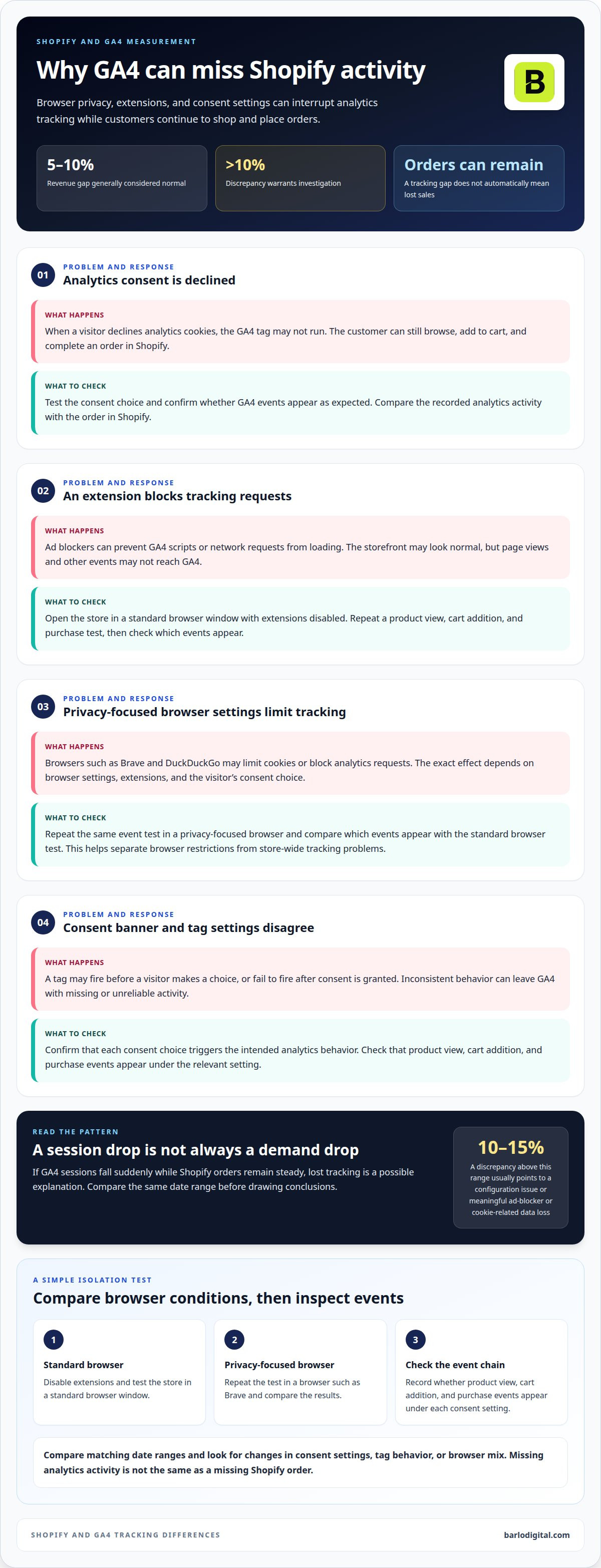
Consent banners, ad blockers, and browser privacy settings can stop GA4 from recording visits and purchases. If a visitor declines analytics cookies, the GA4 tag may not run; if an extension blocks Google Analytics requests, the browser can prevent event data from reaching the analytics account.
This creates a direct gap between Shopify’s store activity and GA4’s recorded activity. A shopper can browse products, add an item to a cart, and complete an order while GA4 misses some or all of those actions. Shopify and GA4 then show different counts, even though the customer’s order exists in Shopify.
Browser extensions are a common source of missing events. An extension designed to block trackers can prevent GA4 scripts or network requests from loading. The customer still sees the Shopify storefront normally. A missing page-view event, however, can break the chain between a marketing click, a browsing session, and a purchase attributed in GA4.
Privacy-focused browsers such as Brave and DuckDuckGo can also restrict analytics tracking. Their privacy settings may limit cookies or block tracking requests. The exact effect depends on the visitor’s browser configuration, extensions, and consent choice. A VPN changes how a connection is routed, but it does not automatically mean GA4 tracking is blocked. Browser privacy controls and extensions are the more direct causes to examine.
A consent banner can create a similar measurement gap. If analytics tags wait for consent, a visitor who rejects analytics cookies may not generate GA4 events. If the banner and tag settings disagree, tracking can also behave inconsistently. For example, a banner may record a consent choice while a tag fires before that choice, or never fires after consent is granted. That makes the banner’s settings part of the measurement setup, not just a display element.
Use the size and pattern of the discrepancy to decide what to investigate. A Shopify-GA4 discrepancy above 10-15% usually indicates a configuration issue or meaningful ad-blocker or cookie-related data loss. A sudden drop in GA4 sessions while Shopify orders remain steady points toward lost tracking, not necessarily weaker demand. Compare the same date range and look for changes in consent settings, tag behavior, or browser mix before drawing conclusions.
To isolate the cause, test the store in a standard browser window with extensions disabled, then repeat with a privacy-focused browser such as Brave. Confirm that consent choices trigger the intended analytics behavior, and that GA4 events appear during a product view, cart addition, and purchase test. Record which events appear under each setting. This comparison helps distinguish browser restrictions from a tag or consent configuration problem without mistaking missing analytics activity for missing orders.
Differences in how Shopify Analytics and GA4 count sessions and visitors
Shopify Analytics and GA4 measure different parts of commerce. Shopify emphasizes ecommerce performance; GA4 focuses on website traffic and customer behavior. Their reports therefore won’t necessarily produce matching session, visitor, or purchase counts. A discrepancy alone doesn’t identify a tracking failure.
A session groups customer interactions within a period of activity. Shopify and GA4 can apply different tracking mechanisms and session rules, so one visit may be grouped differently. Session definitions can differ between analytics tools, so activity may be grouped differently. Page reloads can also be counted differently, while unique visitor totals depend on how each system identifies visitors. The result: one Shopify store can show different sessions and visitors for the same date range.
Orders and sales require a separate comparison from sessions. Shopify’s reports emphasize store transactions; GA4 records purchase activity through configured events. Compare corresponding purchase metrics, not a broad Shopify sales figure against every GA4 event value. Discounts, taxes, and refunds can affect which amount a report displays, while cancellations and test orders can change which transactions belong in the comparison. GA4 won’t necessarily reflect a Shopify adjustment unless the relevant event data is sent and reported. Check the metric definition and underlying transaction records before treating different totals as contradictory.
Time zones can shift activity across reporting dates. If Shopify’s store time zone and GA4’s property time zone differ, an order near midnight may appear on different days. Align the property time zone with the Shopify store, then compare identical date ranges. A weekly trend can appear consistent even when individual daily reports don’t line up.
Duplicate GA4 tags can inflate event counts. For example, installing a tag through both a Shopify integration and another site script may send duplicate events for one page view or purchase. An incorrect integration can also send events to the wrong GA4 property. Review the installation paths and confirm that one customer action produces one intended event.
Currency conversion creates another comparison problem. Shopify and GA4 reports may present amounts differently when store currency and reporting currency don’t match. Refunds or cancellations may also appear differently depending on the report and event data being compared. Separate order count from revenue, and compare amounts using the same currency and transaction scope.
Use this sequence to troubleshoot discrepancies:
- Match the Shopify and GA4 date ranges and time zones.
- Compare sessions with sessions, and purchases with purchases.
- Inspect GA4 event data for duplicate or missing events.
- Review integration settings and confirm the intended GA4 property receives events.
- Reconcile sample orders against Shopify records, including discounts, taxes, refunds, and cancellations.
These checks help distinguish reporting differences from faulty tracking. Record each tag, integration, or reporting-setting change and the date it took effect. This timeline can explain why a metric shifted and keep a configuration change from being mistaken for a change in customer behavior.
Changes to sessions and conversion rate
A conversion rate can change because its inputs changed, even if customer behavior did not. The calculation compares purchases with sessions, so a shift in either measure changes the reported rate. If sessions fall while purchases stay steady, the rate rises. That is an arithmetic change, not proof that the store persuaded more visitors to buy.
Check for changes in the reporting series before interpreting a rate shift. Shopify Analytics data disruptions can result from a changed metric definition or a gap caused by data that could not be recovered. Either can create a break between earlier and later reports. Mark the break in your timeline, then compare periods that use the same definitions instead of treating the whole chart as one continuous measurement.
Conversion rate also depends on which events and orders each report includes. A report based on unique purchases will not necessarily match one based on every purchase event. Before comparing rates, identify the numerator in each platform and confirm that both represent the same kind of completed purchase. Then identify the session measure used as the denominator. Without those definitions, the rates are not a reliable comparison.
Use the pattern across metrics to narrow down the cause. If the rate changes alongside a sudden shift in sessions but purchase activity remains stable, investigate session data and reporting settings. If the purchase measure changes while sessions stay steady, inspect the purchase metric and event reporting. If both shift, examine the date range and any measurement changes during that period.
A Shopify-GA4 discrepancy above 10% warrants investigation. Treat that threshold as a trigger to inspect the measurement, not as a diagnosis by itself. Start by comparing equivalent periods and metric definitions. Then locate the first date when the gap appears and match it against changes to tags, reports, or store measurement settings. This creates a clear boundary between consistent data and the period requiring investigation.
For a useful trend comparison, record each reporting change and its effective date. Note whether it affected sessions, purchase measurement, or both. When a new setup changes a metric’s definition, label the transition in internal reports. This prevents a before-and-after comparison from suggesting a performance shift caused by the measurement change itself.
Conversion rate is useful for decisions only when its inputs are comparable. Review sessions, purchases, and the definitions behind both before changing campaign or store decisions. If you cannot reconcile a rate’s movement with those inputs, treat the discrepancy as a measurement problem to isolate before drawing conclusions about demand or performance.
Checkout and payment-provider referral issues
A payment redirect can break the path GA4 uses to connect a marketing visit with a purchase. During checkout, a shopper may leave the Shopify store to complete payment, then return to the order confirmation page. If GA4 treats the payment provider as a new referral source, it can start or attribute the session differently. Shopify can still record the order while GA4 assigns the purchase to the wrong source.
This creates discrepancies between Shopify and GA4 dashboards. Shopify’s order record shows the transaction; GA4’s attribution report may show the payment provider as the last source. For example, a shopper arrives from a paid search ad, checks out through an external payment page, and returns to the store. If that redirect overwrites the original source, paid search may appear to have driven fewer purchases, while the payment referral appears to have driven more.
GA4 payment-provider referral exclusion should be configured to prevent payment redirects from breaking or misattributing sessions. The exclusion tells GA4 not to treat the listed payment domain as a new referral source. It does not create a missing purchase event or repair every tracking fault. It addresses the referral interruption specifically. The provider domain must be identified correctly, because excluding the wrong domain can leave the redirect problem unresolved.
Review the customer path through checkout, not just the final purchase total. Identify the domain used during payment and check whether it appears as a referral in GA4. Then follow a test transaction from the store’s landing page through payment and back to the confirmation page. Compare the source and session before and after the redirect. A source change at that point is evidence of an attribution break, not proof that the marketing campaign failed.
Use these checks to narrow the fault:
- Confirm the payment provider’s domain from the checkout flow.
- Inspect GA4 acquisition reports for that domain as a referral source.
- Confirm the intended referral exclusion includes the provider domain.
- Test a completed checkout and review the resulting session source and purchase event.
- Compare the test with Shopify’s order record and the GA4 dashboard.
Keep the distinction clear: Shopify answers whether an order was placed and processed; GA4 helps explain the visit and its attributed marketing source. If the order appears in Shopify but GA4 assigns its session to a payment referral, investigate checkout attribution before changing campaign budgets. If GA4 records no purchase at all, examine event delivery separately. A referral exclusion can correct source handling, but it cannot compensate for a purchase event that never reaches GA4.
Shopify store owners can add scripts to checkout settings to track additional events in Google Analytics 4. This offers another way to track activity during checkout when reviewing the customer path. Keep additional event tracking separate from referral exclusion: adding a script does not itself confirm that a payment-provider referral issue is resolved. After a test transaction, review the session source and purchase event, then compare the result with Shopify’s order record.
Comparing trends instead of exact totals
Shopify Analytics and GA4 are different measurement systems, not duplicate screens for one shared database. Shopify emphasizes store performance; GA4 records website activity and configured events. Their exact totals can diverge while both platforms still show the same direction of change. Use each display to assess trends, not to force identical counts.
Start with metrics that describe the same action. Compare Shopify orders with GA4 purchases, or Shopify sessions with GA4 sessions. Don’t compare Shopify revenue with a GA4 event count. Each report answers a different question, and mismatched definitions create apparent discrepancies before the analysis even begins.
If you’re asking why your Shopify data is different from Google Analytics, compare equivalent measures over matching periods before treating the gap as a marketing result. Select the same date range and reporting time zone in both platforms. For example, compare a full week in Shopify with that same week in GA4, rather than a calendar week against a rolling range. A daily dip can reflect reporting boundaries; a repeated weekly decline across both platforms is stronger evidence of a real trend.
Track a small set of aligned measures:
- Shopify orders alongside GA4 unique purchases.
- Store sessions alongside GA4 sessions.
- Revenue alongside purchase value, using matching currency and transaction scope.
- Product views and cart actions alongside their corresponding GA4 events.
Read movement across those measures together. If Shopify orders rise and GA4 purchases rise in the same periods, the sales trend is consistent even if the totals differ. If orders increase while GA4 purchases remain flat, investigate event delivery or reporting definitions. If sessions grow but orders do not, the gap may point to a conversion issue rather than a traffic shortage. One metric alone rarely explains the cause.
Use a consistent comparison window before changing marketing decisions. A single day can be distorted by delayed reporting or incomplete data. Review successive matching periods and note when a tracking, checkout, or campaign change occurred. This timeline helps distinguish a measurement break from a shift in customer actions and gives your team a shared basis for deciding whether to investigate tracking or adjust campaigns.
Knowing why your Shopify data differs from Google Analytics helps set the right role for each platform. Shopify supports transaction reporting, while GA4 helps interpret how visitors behave before purchase. Neither dashboard answers every question. Assign each platform a clear purpose, then act on patterns the available data supports.
When those patterns still conflict, our Shopify and GA4 tracking review can examine event setup and measurement definitions, so marketing decisions rely on a more coherent view of revenue and customer activity.
Barlo Digital
Barlo Digital helps ecommerce teams diagnose tracking gaps that make Shopify sales and GA4 attribution difficult to compare. We examine measurement setup, event delivery, and how revenue connects to marketing activity. The aim is a clearer view of what each platform measures, where reports diverge, and which decisions the data can support.
Turn to us when matching date ranges and purchase metrics still leave unexplained gaps, or when campaign decisions rely on unreliable attribution. Our director-led work focuses on the tracking and measurement problems behind the discrepancy, rather than treating every reporting difference as lost revenue.
If you want help identifying the cause, contact Barlo Digital about Shopify and GA4 tracking.
Make the next decision with better measurement
Understanding why your Shopify data is different from Google Analytics matters because attribution is useful only when its limits are clear. Decide which figures should guide sales reporting, which should guide campaign evaluation, and whether the tracking between them is reliable enough to inform budget decisions.
Barlo Digital provides ecommerce tracking and measurement audits, as well as ecommerce ad management across Meta, Google, and TikTok. We also provide local SEO and AI search for businesses with those needs. The right scope depends on the measurement problem you need to solve, not on forcing every data source into one total.
If you’re ready to connect store revenue with marketing decisions more clearly, contact Barlo Digital about attribution. A sound measurement foundation gives your next decision a firmer basis.
Frequently Asked Questions
Can I connect Shopify revenue to my marketing attribution data?
Yes. GA4 can connect purchase events and revenue with marketing activity when Shopify tracking and campaign attribution are configured consistently. For Google Ads analysis, link the GA4 property to Google Ads so you can assess key events and create audiences. For example, a campaign-tagged visit can be connected to a recorded purchase, helping you evaluate revenue by source. Treat attributed revenue as a measurement view, not a replacement for Shopify’s order records.
How much of a discrepancy between Shopify and GA4 is normal?
A Shopify-GA4 revenue discrepancy of 5-10% is generally considered normal. A gap above 10% warrants investigation, especially if it grows or begins suddenly. A discrepancy above 10-15% usually points to a configuration issue or meaningful data loss from ad blockers or cookie settings. Compare equivalent purchase metrics and periods first. A different session count alone doesn’t establish that revenue tracking is broken.
How does Shopify define orders, sales, refunds, discounts, and taxes compared with GA4?
Shopify records an order when it is placed and payment is processed, while GA4 records a purchase when its tracking code fires on the order confirmation page. Sales totals may differ depending on how each report handles discounts, taxes, and refunds, so compare matching transaction scopes and metric definitions.

Article by
Carlos Benavides
Carlos Benavides founded Barlo Digital and is its Director of Paid Media and Performance. He has fifteen years in direct-response marketing, more than $50M in lifetime ad spend, and a B.S. in Computer Science, which is why tracking at Barlo Digital is built by hand. Barlo Digital is a director-led paid media and search agency serving US ecommerce brands, home-service companies and practices.


