

Google Ads conversion tracking records actions such as purchases, quote requests, phone calls, sign-ups, and button clicks after ad interactions. Setup has two parts: create a conversion action in the account and install the Google tag on the website. When Google Ads conversion tracking is broken, leads may still arrive while the account reports few or none.
Missing conversion data does not prove sales have stopped. Treat it as a measurement issue until you compare Google Ads with actual sales records and trace the path from conversion action to tag and consent settings. This guide explains how to find the gap, test whether conversions are recorded correctly, and distinguish a genuine drop in leads from a tracking problem. It also covers how consent choices can affect measurement and what to inspect before changing campaign settings. The goal is to restore a reliable view of lead activity before incomplete data leads to poor decisions.
Key Takeaways
- After a website upgrade, trace the conversion path from the action to the tag and the page where the lead is recorded.
- Separate a real drop in leads from a reporting failure by comparing Google Ads data with sales records.
- Review conversion action statuses and test whether the correct event fires once, with the right value.
- Check how consent choices affect tag behavior before treating modeled or missing conversions as campaign performance.
- Fix the measurement fault before changing bids or budgets based on incomplete data.
What is conversion tracking in Google Ads?
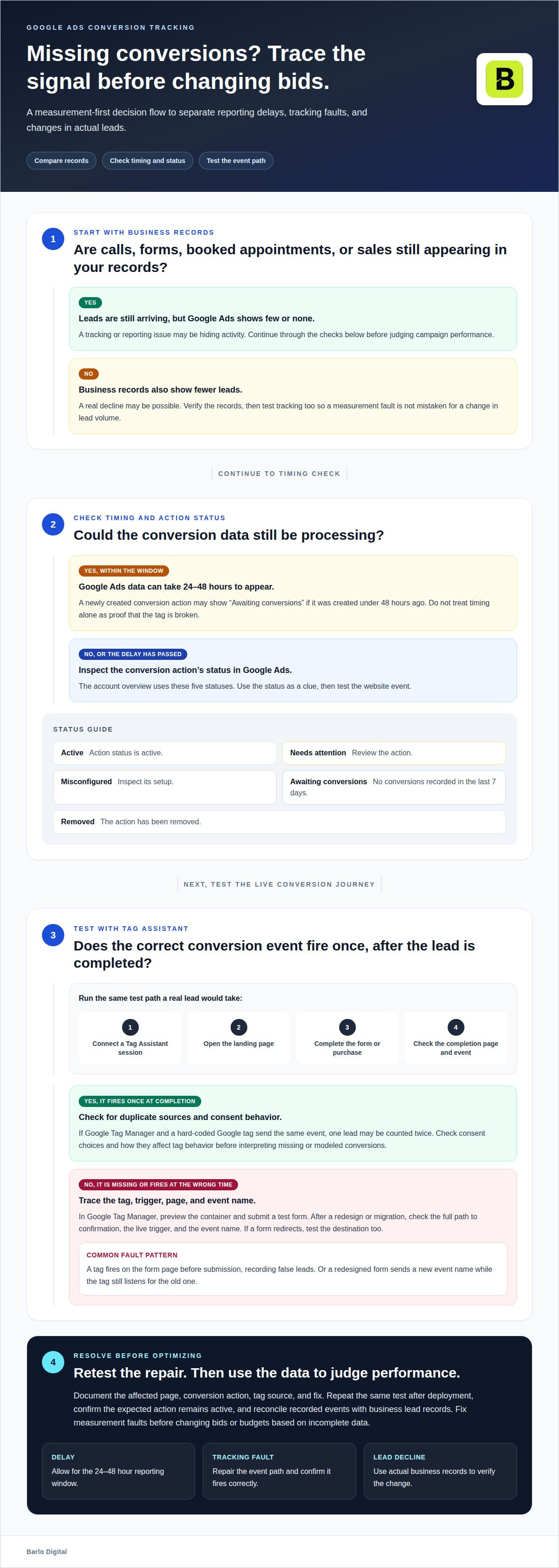
Google Ads conversion tracking records actions such as quote requests, calls, purchases, and sign-ups after ad interactions. To test tracking with Tag Assistant, connect to the website, complete a test conversion, and check whether the expected Google tag fires on the correct page. If a tag stops firing after a website update, campaigns may optimize against incomplete data.
- Identify the conversion action that matters. Choose the business result Google Ads should record, such as a submitted quote form or completed purchase. A page view alone may not prove a lead arrived. Match the conversion action to the real event, then confirm its name and purpose in Google Ads before changing tags.
- Check the action’s status before editing code. Google Ads shows five overview statuses: Active, Needs attention, Misconfigured, Awaiting conversions, and Removed. A newly created action may show “Awaiting conversions” if it was created under 48 hours ago. Conversion data may take 24-48 hours to appear, so separate processing delay from a broken implementation.
- Test the website with Tag Assistant. Start a Tag Assistant session, open the landing page, and complete the conversion journey. Confirm the Google tag loads and the relevant conversion event fires once on the completion page. If the form redirects, test the destination too. A tag firing on the form page before submission can record false leads.
- Inspect Google Tag Manager after deployments. A developer may replace a container, change a trigger, or remove a tag during a redesign. In Tag Manager, trace the conversion tag to its trigger and check whether the trigger still matches the live page or event. Preview the container, submit a test form, and compare the firing sequence with the intended action.
- Audit migrations page by page. A domain change, new checkout, or rebuilt form can alter URLs, buttons, and event names. Test the complete path from ad landing page to confirmation, not only the homepage. For example, a migration may preserve the Google tag but remove the old thank-you-page trigger. That leaves the tag present while conversions disappear.
- Look for duplicate firing. If both Google Tag Manager and a hard-coded Google tag send the same event, one lead may be counted twice. Compare event firing during a single test submission, then remove or correct the duplicate source. Also check whether an imported analytics event duplicates a direct Google Ads conversion action.
- Document the repair and retest. Record the affected page, conversion action, tag source, and fix. Repeat the same test after deployment, then confirm the expected action remains active in Google Ads. A tracking and measurement audit can help isolate tag, event, and reporting faults across a website.
Effects of missing conversion data on lead generation
Google Ads conversion data may take 24-48 hours to appear. If it remains absent, inspect the action status and event path before assuming lead volume has fallen.
- Separate reported leads from actual leads. Compare incoming calls, submitted forms, booked appointments, and sales records with Google Ads conversions. A tracking failure can make a functioning campaign appear unproductive. The reverse also matters: a rise in recorded conversions may reflect duplicate events, not more valuable leads. Use the business’s lead records to establish what actually happened.
- Check whether the action is recording. An “Awaiting conversions” status means the action has recorded no conversions in the last 7 days. Confirm the selected action matches the lead outcome you need, then inspect whether the event fires after a real submission. If the event fires but Ads records none, check attribution and tag configuration before changing campaign bids.
- Review data layer values. A data layer passes event details from the website to its tags. Confirm that the lead event name and relevant values match the trigger used by Google Tag Manager. For example, a form may now send
form_successafter a redesign while the tag still listens for the old event name. That mismatch silently blocks conversion reporting. - Assess enhanced conversions separately. Enhanced conversions can use hashed, user-provided data to help match conversions with ad interactions. They do not replace the conversion event itself. First establish that the lead event fires, then review whether the data fields are passed correctly and handled according to the site’s consent choices. Treat matching support as an added measurement layer, not a repair for a missing tag.
- Use data exclusions for bad data periods. Google Ads data exclusions can address missing or bad conversion data, including spam lead attacks or conversion over-counting. Apply them to the affected period and understand the scope before saving. Google says exclusions are taken into account within a week, and bidding performance may be turbulent while the system adjusts.
- Contact Google Ads support with a reproducible case. Sign in to Google Ads, open Help, and use the available contact option. Include the conversion action name, its status, the affected dates, and what happened during a test lead submission. This gives support a specific tracking path to investigate instead of a vague report of missing leads.
- Fix the measurement fault before judging lead quality. Reconcile recorded events with lead records, then retest the event after changes. A focused tracking and measurement review can trace discrepancies across tags, event values, and campaign reporting.
Comparing ad platform reports with sales records
To import GA4 conversions into Google Ads, link the accounts and import the relevant GA4 event as a conversion action. Include event value, currency, and transaction_id where applicable. Then compare that action with sales records using matching dates and conversion definitions.
- Set a clean comparison period. Compare Google Ads totals with source-of-truth sales data across the previous 7 to 30 days. Use the same dates and lead or purchase definition on both sides. A form submission in Google Ads should not be compared with closed sales in a CRM. Those measure different stages, so their totals will not match.
- Choose the record that reflects the actual outcome. Use completed orders, accepted leads, or another recorded business result as the reference point. For ecommerce, compare Google Ads purchases with completed orders in the order system. For lead generation, compare recorded form submissions or calls with the corresponding sales records. Identify what should happen after the ad interaction.
- Reconcile totals before changing campaigns. Create a simple table with dates, platform conversions, and sales records. Mark the size and direction of each difference. For example, 47 Stripe purchases compared with 12 Meta Ads Manager conversions represent a 74% tracking gap. That example is a discrepancy, not proof that either platform caused it.
- Check whether values are transmitted correctly. Place a test order with a known purchase amount, then inspect Google Ads reporting. If a $127.50 purchase appears as $1.27 or $12,750, investigate decimal formatting, currency, and value parameters. A correct conversion count with incorrect values still corrupts revenue reporting and campaign evaluation.
- Account for time between click and outcome. If customers typically purchase 14 days after their first ad click, a 7-day attribution window may miss some conversions. Compare mature date ranges rather than treating the newest period as complete. Keep the conversion window and sales cycle in view when interpreting gaps.
- Inspect imported GA4 events for mismatches. Confirm the imported event represents the same action counted in sales records. Check event value, currency, and transaction_id, then look for repeated purchases or missing identifiers. Keep the definition consistent across GA4, Google Ads, and the order system to prevent double counting.
- Make reconciliation a recurring control. Compare the previous week’s platform totals with CRM or order-system records every Monday. Track whether accuracy shifts from 95% to 85% to 70% over several weeks. A downward pattern can expose a gradual tagging or import fault before the discrepancy distorts campaign decisions.
Consent Mode and conversion modeling
- Separate consent effects from tag failure. Google Ads Consent Mode adjusts website tags based on cookie consent choices and uses conversion modeling. A consent-related reporting gap differs from a tag that never fires. First establish whether the event works when the site records it, then inspect how consent choices affect tag behavior and reporting.
- Check where Consent Mode applies. It is intended for advertisers operating in the European Economic Area, the United Kingdom, or Switzerland. A US business serving those areas may need to account for consent-dependent measurement. Don’t assume that missing US conversion data is automatically a Consent Mode issue; first trace the affected audience, site behavior, and conversion event.
- Inspect the consent-to-tag sequence. Follow a test visit from the consent banner through a conversion action. Record whether the visitor accepts or rejects cookies, then observe whether the relevant tag responds to that choice. If the tag fails for every test, investigate implementation. If behavior changes only with consent, inspect consent configuration before altering campaign settings.
- Distinguish observed conversions from modeled conversions. A modeled conversion is an estimate used to account for some activity that tags cannot directly observe. It is not a replacement for a working conversion action. Compare platform reporting with recorded sales or leads, and note whether the difference follows a consent choice or appears across all visits and devices.
- Review privacy changes before deployment. GDPR and CCPA are privacy regulations that may prompt a Consent Mode rollout affecting Google Ads conversion tracking. Map any site changes to the dates when reporting shifted. For example, a new consent banner and a tag update deployed together create two possible causes. Test each layer independently instead of changing both again.
- Validate the event after consent configuration changes. Submit a test form under each relevant consent choice, then inspect whether the expected event fires and reaches Google Ads. Check the event name and conversion action, not just whether the page loads. Keep a record of the test result, consent state, and affected page so later comparisons use the same conditions.
- Keep bidding decisions separate from measurement diagnosis. Don’t treat modeled totals as proof that every lead has been counted, or as proof that tracking is broken. Compare trends with sales records and assess whether consent behavior explains the discrepancy. If the event itself fails, repair the event first. If it fires but reporting differs, investigate attribution and modeling.
Use that scope to guide diagnosis, not to jump to a conclusion. Confirm that the affected visits match the audience and site behavior you are examining, then compare the same conversion action under different consent choices. Record the consent state for each test so you can interpret reporting differences. If results vary by consent state, review the sequence from consent to tag firing. If they do not, investigate the event itself rather than assuming consent caused the gap.
Keep campaign settings unchanged during the comparison, and use consistent test conditions to determine whether a change affected tag behavior or reporting.
Creating conversion actions and installing the Google tag
Effective conversion tracking depends on defining the actions to measure and implementing the necessary website tracking. Verify each one, then test the complete customer journey before relying on campaign reports.
- Define the business outcome first. Choose the action Google Ads should count, such as a submitted quote request or completed purchase. Name it for that outcome, not just its page. A conversion called “Lead form submitted” is easier to distinguish from a generic page-view action when reviewing account reports.
- Create one action for each distinct outcome. In Google Ads, create a conversion action and set its source to match where the event happens. A website purchase and a phone call are different outcomes, so they need clear, separate definitions. Avoid creating multiple actions for the same event unless they serve distinct reporting needs.
- Choose the counting method deliberately. For purchases, counting every transaction can reflect repeat orders. For a lead form, counting one conversion per ad interaction can avoid treating repeated submissions as separate leads. Select the method that matches the business outcome, then document the reason so later account changes don’t quietly alter the measurement.
- Set attribution to fit the customer path. Google Ads lists a 30-day attribution window for Search and a 1-day window for Display. Review the selected window against the time customers take to act. A short window can miss conversions that happen after a longer decision process, while platform totals may differ when reports use different attribution settings.
- Install the Google tag at the site level. Add it directly to the website or deploy it through Google Tag Manager. Confirm the tag loads on the pages where ad traffic lands and the conversion event fires after the real action. For a form, trigger the event after successful submission, not when someone merely opens the form. For businesses building a new site or overhauling user journeys, coordinating with development partners such as thinktank.co.za can help ensure proper tag placement and data layer setup across every template.
- Pass accurate event details. For purchases, check that value and currency reflect the completed transaction. A transaction identifier can help distinguish separate orders from duplicate event firing. For lead forms, use a success event tied to completion. The event name in the site implementation must match the trigger that sends the conversion.
- Test the full sequence before changing bids. Complete a test conversion, inspect the tag and event, then confirm the action status in Google Ads. Allow 24-48 hours for conversion data to appear. If the action remains inactive, trace the event, trigger, and conversion identifier before adjusting campaign settings. A Google Ads tracking review can isolate these implementation faults.
Barlo Digital
Barlo Digital helps businesses identify measurement problems that undermine paid media decisions. A director runs every account, and senior-level operators handle the work directly. We connect tracking reviews with campaign and sales data to support informed decisions.
For ecommerce, our tracking and measurement work addresses measurement gaps across the customer journey. For brands with physical locations or multi-channel funnels, we align call and lead measurement with paid campaigns to fix broken google ads conversion tracking. The focus stays on the issue affecting your data, not a generic platform review.
Make the next campaign decision with reliable data
Broken Google Ads conversion tracking can distort which campaigns seem worth funding and which leads appear valuable. Before making another optimization decision, confirm that your data connects reliably to business outcomes.
Barlo Digital identifies measurement faults and aligns tracking with paid media decisions. Our services include ecommerce tracking and measurement audits, ecommerce ad management, and local SEO and AI search, when relevant to your business.
If the cause remains unclear or the issue returns after site changes, contact us for tracking help. Take the next step with a clearer basis for managing your campaigns.
Frequently Asked Questions
How do you diagnose broken Google Ads conversion tracking?
Find where a real lead stops appearing in the measurement chain. Submit a controlled test, confirm that the lead reaches your form or sales system, then compare that record with the matching Google Ads conversion action. If the website records the lead but Ads does not, investigate tagging, conversion action settings, or attribution. If neither records it, start with the form or website event.
How do you check the Google tag and Google Tag Manager conversion setup?
Check the published Google Tag Manager container, not just a workspace draft. Use Preview mode to follow a test conversion and confirm that the intended tag fires on the success event. Check that the Google tag is present on both the landing page and completion page. If the container ID or event name changed, the live website may still load while the conversion trigger no longer matches.
Why are Google Ads conversions not recording or showing as zero?
Conversions may show as zero if no eligible Google Ads click preceded the event, the event did not fire, or the selected action tracks a different outcome. A test from a direct visit may not count as an Ads conversion because it lacks the required ad interaction. Check sales records for leads during the same period, and review the conversion action’s status before interpreting zero reported conversions as zero demand.
How do you fix Google Ads conversion tracking after a website change?
Compare the current website journey with the previous conversion path, then identify changes to page URLs, form behavior, event names, or tag deployment. For example, a new booking tool may complete submissions inside an embedded frame instead of on a confirmation page, an issue frequently encountered by specialized developers like Future Marketing para Saúde when building medical websites with integrated scheduling. Adjust the trigger to match the live completion event, publish the container, and test the entire path from entry page to successful submission.
How do you troubleshoot the Google Ads conversion linker and Consent Mode?
Check that the conversion linker tag fires on relevant pages and that consent settings do not unexpectedly block or alter tag behavior. Test the same conversion with different consent choices, then compare the tag sequence and event result. If only journeys across multiple domains fail, inspect how visitors move between domains and whether tracking continues during that transition. Keep test conditions consistent.

Article by
Carlos Benavides
Carlos Benavides founded Barlo Digital and is its Director of Paid Media and Performance. He has fifteen years in direct-response marketing, more than $50M in lifetime ad spend, and a B.S. in Computer Science, which is why tracking at Barlo Digital is built by hand. Barlo Digital is a director-led paid media and search agency serving US ecommerce brands, home-service companies and practices.


