

Bad marketing data does not stay contained. It distorts reports, creates duplicate customer records, and sends incomplete leads into the wrong workflows. Learning how to validate marketing data means checking records for completeness, correct formats, plausible values, uniqueness, and permission before they move downstream.
These checks matter because a record can look usable while still having a missing field, malformed email address, or duplicate entry. Validation makes data more trustworthy, but it does not prove that every fact is true.
This article explains what validation does, how rules work in CRM and marketing automation systems, and how ongoing checks catch errors at entry and during later reviews. You will also learn how validation differs from verification, cleaning, and standardization, and how these controls help keep customer records accurate.
Key Takeaways
- Use checks for required fields, expected formats, plausible values, and relevance to catch records that could disrupt campaigns or reporting.
- Apply validation at data entry and during scheduled reviews so errors are caught before they spread through CRM and marketing automation workflows.
- Use matching rules and clear handling decisions to identify duplicates and prevent incomplete records from being treated as ready for use.
- Separate validation from verification, cleaning, transformation, and standardization so each data-quality task has a clear purpose.
- Log rejection reasons and review validation rules as data sources and business needs change.
What is data validation?
Data validation applies rules to marketing records before they enter reports, campaigns, or customer workflows. It tests whether each record is complete, correctly formatted, plausible, relevant, and permitted for its intended use.
Accuracy and Relevance Checks
Accuracy and relevance checks assess whether marketing data fits expected formats and business context. An email address can pass a syntax check but still be inactive or mistyped. A campaign conversion can also contain a correctly formatted event that belongs to the wrong campaign. These checks matter because plausible-looking inputs can distort attribution and decisions.
Rules should distinguish what a system can test from what requires confirmation. A date field can reject malformed entries, while another rule can flag a value outside the expected range. Relevance checks can test whether a lead matches the intended geography, market, or source. A record that passes format checks but fails those conditions is not ready for a campaign.
Completeness and Structure Checks
Completeness and structure checks confirm that required fields exist and follow the expected schema. For example, a lead form may require an email address, source, and timestamp. A validation rule can reject an empty routing value or malformed date before the record enters a CRM workflow. This matters because missing fields can break routing, reporting, or conversion attribution.
Structure checks also catch mismatched formats between systems. A date stored as DD/MM/YY may be interpreted differently from YYYY/MM/DD. A missing timestamp can strip an advertising impression of useful context. Define required fields and acceptable formats for each source, then route failed records for correction or rejection instead of passing them downstream.
Marketing Data Quality KPIs
Marketing data quality KPIs quantify how often records pass validation, contain duplicates, or lack required fields. Teams can also track consent-related rejection rates, time from capture to accepted lead, and sales acceptance or conversion after rule changes. These measures show where data fails and whether corrections improve its downstream use.
Pair each KPI with the validation rule it measures. A rising missing-field rate points to form or source problems; a high duplicate rate suggests weak matching controls. Review results over consistent reporting periods and log rejection reasons. This makes trends actionable instead of reducing data quality to a single pass percentage.
Data governance defines the standards, ownership, access controls, and handling practices behind these checks. A documented rule should identify the field, acceptable values, failure reason, and next action. For example, an empty campaign source can be rejected or routed for correction. Clear ownership ensures someone investigates repeated failures before errors accumulate.
Privacy checks are part of validation, not a separate cleanup step. The European Union identifies GDPR and CCPA as data protection regulations relevant to marketing data validation. In the United States, collecting personally identifiable information in marketing analytics can violate GDPR and CCPA requirements, according to the European Data Protection Board and California Privacy Protection Agency.
PII detection can flag fields containing personal details, such as email addresses or phone numbers, for appropriate handling. A record should not move forward as clean when consent is missing, unclear, expired, or unsupported for its intended use. Governance should document who can access sensitive fields and how failed consent checks are recorded.
Validation in CRM and marketing automation systems
CRM validation works best at data entry, followed by checks across connected platforms. Automation catches routine errors, while periodic reviews uncover failures that rules miss.
Manual and Automated Validation
Manual validation uses people to inspect records and investigate exceptions; automated validation applies rules to each input or batch. Automation handles repeatable checks, while human review helps resolve ambiguous cases, such as two customer records with similar names but different email addresses.
Use both. Configure automatic checks for required fields and expected formats, then route flagged records for review. This catches routine errors without treating every unusual value as invalid.
Validation Tools and Comparisons
CRM field rules, marketing automation workflows, and data-matching processes can all validate records. CRM rules can block missing fields at entry; workflows can route or reject records using business conditions; matching processes compare data across systems to expose inconsistencies.
Each approach solves a different problem. Entry rules act immediately, while scheduled batch checks review larger datasets. Cross-platform matching tests consistency between sources. Choose based on where errors begin and where they cause damage, not on a tool’s label.
Validation Steps and Frequency
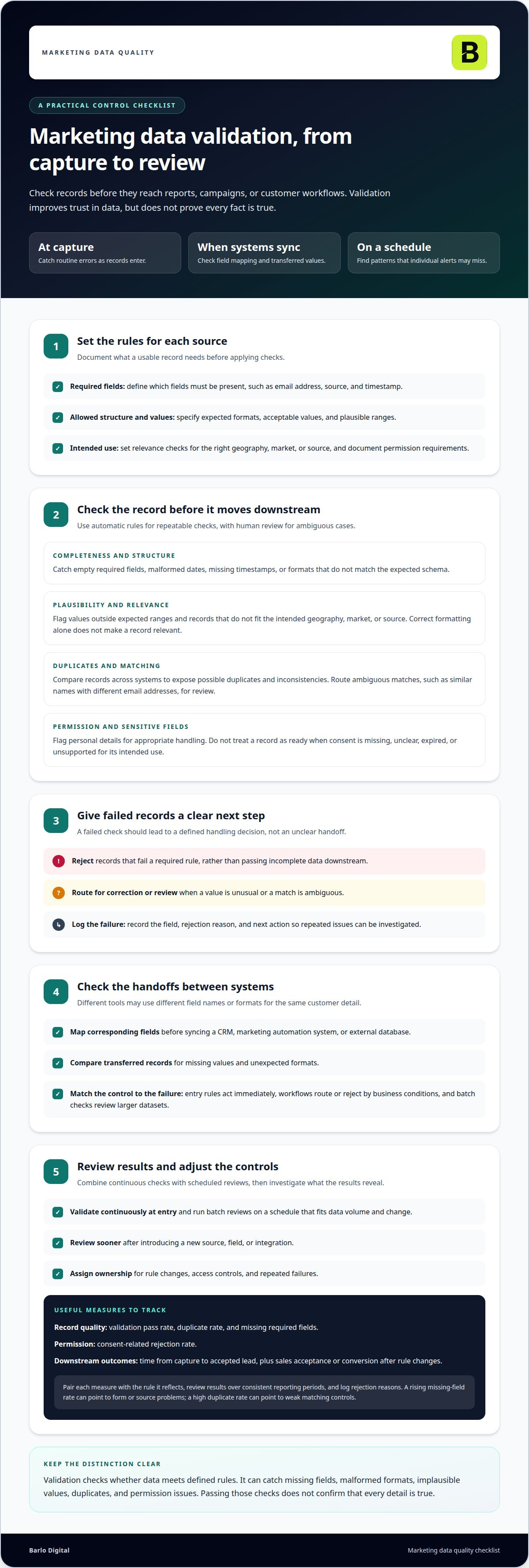
A practical sequence is to define required fields and acceptable values, apply checks at capture, log failures, route exceptions, and review results. This is how to validate marketing data step by step, without treating a single pass as proof of accuracy.
Validate continuously at entry, then run batch reviews on a schedule that fits data volume and change. Review sooner after introducing a new source, field, or integration. Ongoing checks catch fresh errors; periodic audits reveal patterns that individual alerts may miss.
Integration creates another failure point. A CRM, marketing automation system, and external database may use different field names or formats for the same customer detail. Map corresponding fields before syncing, then compare transferred records for missing values and unexpected changes. A unified customer view is useful only when connected platforms preserve consistent data.
Monitoring should make failures visible. Log which rule rejected a record, the source that supplied it, and the next action. Alert the responsible owner when rejection patterns rise or expected data stops arriving. These signals help distinguish a poor input source from a broken workflow or changed field format.
Platform changes can disrupt validation. An API update may alter how a source sends fields, causing rules to reject good records or accept incomplete ones. Monitor provider updates, review validation logs, and adjust rules when formats change. AI automation workflows can support connected processes where validation results need to trigger routing or follow-up.
Preventing duplicate and incomplete customer records
Duplicate records split customer history, while missing fields make records harder to route and analyze. Validate campaign tracking by checking that UTM parameters persist from landing page to conversion, then compare event counts and identifiers across sources. Investigate a repeated purchase event or unexpected zero value before it shapes ROI reporting.
Duplicate Detection and Consistency
Duplicate detection compares records using matching algorithms and unique identifiers, while consistency checks look for conflicting values across sources. These controls matter because two entries for one person can divide behavior and campaign history between records.
When a match appears, decide whether to merge, enrich, suppress, or reject it. A shared email may signal a duplicate, but matching rules should account for the available fields and the effect on customer history. Regular audits help identify duplicates entering through forms, imports, or connected platforms.
Incomplete Customer Records
Completeness checks identify records missing fields needed for routing, analysis, or follow-up. For example, a lead without a source value may remain in the CRM but cannot support clear source-level attribution.
Audit records for gaps, define which fields are essential for each use, and set a quality threshold before records move forward. Fill missing values only when a reliable source provides them; otherwise, route the record for correction or remove it from workflows that depend on the absent field. This preserves useful insights without presenting unknown information as fact.
Duplicate Events and Suspicious Zero Values
Event validation detects repeated conversion signals and values that conflict with expected behavior. A duplicate purchase event can inflate revenue and conversion metrics by 100%, making the campaign appear to perform better than it did.
A zero value needs context, not automatic rejection. It may be valid for an event that does not represent revenue, but it can also indicate a missing value or tracking fault. Compare event names, timestamps, transaction identifiers, and source records. Flag inconsistent patterns for investigation before using them in ROI calculations.
UTM checks should confirm that source, medium, and campaign values remain consistent throughout the reporting path. For example, if a landing-page visit carries a campaign value but the resulting conversion loses it, attribution may be incomplete. Compare captured parameters with the conversion record and analytics event. This helps pinpoint whether the break occurs during capture, transfer, or reporting.
Zeroes and duplicates can also reveal system behavior. A sudden cluster of identical conversions from one source may indicate repeated firing; a zero-value cluster may point to a field-mapping or event-definition problem. Review changes in tracking setup alongside these patterns. The tracking and measurement audit can help identify breaks that compromise campaign measurement.
Validation versus verification, transformation, and standardization
These processes address different data quality problems. Define each clearly, or formatting changes may be mistaken for proof that a record is accurate.
Format Accuracy and Standardization
Standardization makes equivalent values consistent, while format validation checks whether entries follow the required structure. For example, campaign sources entered as “paid social” and “Paid Social” can be standardized to one label. This creates a stronger foundation for grouping records and comparing performance across platforms.
Transformation reformats data for a destination system; standardization aligns entries to shared conventions. A purchase-event schema may require currency as a three-letter ISO code, such as USD, according to the International Organization for Standardization. A check can enforce that structure, but it cannot establish whether the purchase or amount is real.
Standardized Data Collection
Standardized collection uses forms with required fields, controlled options, and entry rules. A dropdown for campaign source prevents free-text variations from spreading across new records. Consistent collection reduces correction work and makes later validation more reliable.
Forms should reflect the organization’s actual reporting and routing needs. Require only fields that serve a defined purpose, and use clear choices for repeated values such as lead source or product category. If the same form varies across landing pages, map each field to a shared data dictionary before comparing submissions.
Validation asks whether a record is usable and allowed under defined rules. Verification asks whether a fact is real. An email field can pass a syntax check because it contains the expected characters, yet that does not prove the address belongs to the person who submitted it. The distinction prevents a clean format from being mistaken for confirmed truth.
Cleaning acts on data by removing duplicates, correcting errors, or standardizing formats. Transformation changes the structure or representation needed by a receiving system. For instance, a source may store a date one way while an analytics destination requires another. Transformation maps the value to the destination schema; validation then checks whether the result meets that schema.
Keep the sequence clear: standardize collection where possible, transform values for the receiving platform, then validate structure and business rules. Verification remains separate when a decision depends on whether a claim reflects the actual customer or event. A data dictionary should record field meaning, accepted values, and destination mapping. Without that reference, teams can use the same label for different concepts and produce incompatible reports.
These distinctions matter when diagnosing a failed conversion report. A malformed event may need transformation, an inconsistent campaign label may need standardization, and a syntactically valid but false value requires verification. Validation identifies records that fail defined conditions. It does not repair every defect or guarantee factual accuracy.
Marketing data validation definition and purpose
Inaccurate marketing data can distort reports, misroute leads, waste spend, and weaken trust between marketing and sales. A campaign can appear profitable or ineffective because its inputs and conversion records are unreliable.
Purpose of Marketing Data Validation
Marketing data validation applies defined checks to determine whether data is usable, relevant, and permitted for its intended purpose. It creates a control between collection and decisions, so flawed inputs do not silently shape campaign reporting or customer workflows.
Connect each validation rule to a decision. For example, a campaign source field must distinguish paid search from email if leaders use it to compare channel performance. If the field is missing or inconsistent, the resulting report cannot support sound strategy. A rule makes that failure visible before teams act on it.
Validation improves trustworthiness, but it does not guarantee factual accuracy. A syntactically valid conversion record may still describe the wrong event. Tie validation rules to the question being answered, such as whether a lead belongs in a campaign report or an event can support revenue analysis.
Risks of Inaccurate Marketing Data
Inaccurate records can inflate or suppress campaign results, misdirect follow-up, and force teams to spend time correcting avoidable errors. Duplicate advertising-spend rows, for example, can overstate reported budgets and distort performance comparisons.
These errors affect strategy beyond the dashboard. If marketing reports conversions that sales cannot match to accepted leads, the teams may question the same campaign for different reasons. Missing context, conflicting source values, or repeated events can make the disagreement harder to diagnose.
Data quality problems can also spread. An incorrect source value copied into a CRM may later feed audience lists, automation, and reporting. Each downstream system can reuse the inconsistency, turning one bad input into several misleading insights. A rejection reason and clear owner help trace the error to its origin.
Use validation results to distinguish a campaign problem from a measurement problem. Compare accepted and rejected records, then group failures by source, field, and rule. If one form repeatedly omits campaign source, fix the collection process. If records fail after transfer, investigate the mapping or destination schema.
Governance makes this response repeatable. Document each rule’s purpose, owner, failure reason, and next action. Review rules when campaign strategies, collection sources, or reporting needs change. A rule built for one use may exclude data needed for another, so business context must remain part of the decision.
The practical takeaway is clear: validate before data drives spend, attribution, or follow-up. Track inconsistencies and how they are handled, then use those patterns to improve the validation process. Cleaner inputs make ROI analysis more useful, while human review remains necessary when a rule cannot determine a record’s meaning.
Barlo Digital
Barlo Digital helps businesses connect marketing activity with dependable measurement. When campaign results shift unexpectedly, we assess tracking and measurement issues that affect how conversions and ROI appear in reports. Our work is relevant when records, events, or platform data make it difficult to distinguish a performance change from a measurement failure.
That assessment is not a substitute for CRM governance or a standalone CRM system. It focuses on marketing measurement problems that affect campaign decisions, including gaps between ad activity and reported outcomes.
If inaccurate tracking is clouding your campaign results, contact Barlo Digital to discuss the issue.
Make the Next Decision on Better Evidence
Reliable measurement is not a one-time cleanup. Treat it as an operating control that evolves with new campaigns, sources, and reporting needs. Knowing how to validate marketing data gives your team a way to separate tracking defects from genuine performance changes and focus on the right cause.
The next step is to identify where confidence breaks down: at data capture, during platform transfer, or in the final report. Barlo Digital’s ecommerce tracking and measurement audit helps investigate problems that make campaign results difficult to interpret. Our work also includes ecommerce ad management across Meta, Google, and TikTok, alongside local SEO and AI search.
Bring the measurement issue into focus and decide what needs attention first. Contact Barlo Digital about your data validation needs, and move forward with a clearer basis for marketing decisions.
Frequently Asked Questions
Can validation happen without standardization?
Yes. A system can reject a missing email field even if different teams use different labels for campaign sources. But inconsistent values make comparisons harder: “paid social” and “social paid” may be treated as separate categories. Standardize fields used for grouping or reporting, while applying basic checks to other fields. The right order depends on whether inconsistent formats prevent a validation rule from working.
What Are the Most Common Analytics Errors?
Common errors include duplicate conversion events, missing campaign parameters, incorrect event names, broken source attribution, and mismatched date or currency formats. For example, a checkout event sent twice can make one order appear as two conversions. Another failure occurs when a landing-page visit has campaign details but the purchase record loses them. Review event definitions and data transfers to locate the break.
What should you measure?
Measure pass rate, duplicate rate, missing-field rate, consent-related rejection rate, and time from capture to accepted lead. Add sales acceptance and conversion measures when assessing whether validation changes improve lead usefulness. A dashboard should show each metric by source or form, not just as one combined total. This breakdown helps identify where failures originate and whether a specific correction changes the pattern.
What is marketing data validation?
Marketing data validation uses defined checks to decide whether marketing records can be used for a specific purpose. For example, an analytics event may need a recognized event name and campaign identifier before entering an attribution report. Validation can flag records that fail those conditions, but it cannot establish that every submitted detail reflects a real customer action.
What marketing data quality dimensions should be checked?
Assess accuracy, completeness, consistency, uniqueness, relevance, and permission for the intended use. The priority depends on the record’s destination. An audience record needs usable identifiers and appropriate consent; a revenue report needs consistent event and transaction data. Track these dimensions separately, so a strong format-compliance score does not conceal missing context or duplicate records.
How to check marketing data for accuracy and completeness?
Compare important fields with an independent system of record, then check whether required values are present. For example, compare completed orders in a commerce platform with purchase events in analytics, using shared transaction identifiers. Review exceptions separately: a missing identifier differs from a conflicting order value. Keep the original record and correction reason available for later investigation.
How to detect duplicate, outdated, or inconsistent marketing records?
Compare stable identifiers first, then look for near-matches across names, email addresses, or transaction details. To find outdated records, use timestamps and source update history, then flag entries that conflict with newer information. For inconsistent records, compare shared fields across platforms. Avoid automatic merges when key details disagree; route those cases for review so histories remain interpretable.
How to reconcile marketing analytics data with CRM and sales data?
Choose a shared identifier, such as a lead ID or transaction ID, and map equivalent fields before comparing totals. Align the reporting period and conversion definition, then separate unmatched records from matched ones. A CRM lead may represent an inquiry, while analytics counts a form submission; these are different events. Document the distinction before judging campaign performance against sales outcomes.

Article by
Carlos Benavides
Carlos Benavides founded Barlo Digital and is its Director of Paid Media and Performance. He has fifteen years in direct-response marketing, more than $50M in lifetime ad spend, and a B.S. in Computer Science, which is why tracking at Barlo Digital is built by hand. Barlo Digital is a director-led paid media and search agency serving US ecommerce brands, home-service companies and practices.


