

More tracking isn’t automatically better tracking. For an ecommerce business, the pros and cons of server-side tracking come down to whether browser-based purchase data is incomplete enough to justify added control, implementation work, hosting, and upkeep.
Client-side tracking sends events from a shopper’s browser to analytics and advertising platforms. Server-side tracking routes those events through your website’s server first, giving you more control over what gets forwarded. This can help capture purchase events more reliably, but it adds technical complexity and does not make every event accurate by default.
Costs depend on the setup. This article compares the two methods, explains where a hybrid setup can fit, and outlines what to weigh before choosing. The key question is whether greater control over measurement is worth the ongoing operational work for your store.
Key Takeaways
- Choose between browser-based, server-side, and hybrid tracking based on which events you need to capture and how much control you need over what gets shared.
- For ecommerce, purchase events confirmed by your backend can provide a more dependable measurement signal than relying only on a thank-you page.
- Server-side tracking changes how data is collected, not whether privacy obligations or visitor consent matter.
- Assess your event flow, platform needs, hosting, and ongoing maintenance before deciding whether the added tracking control justifies the operational load.
Is server-side tracking right for your business?
Server-side tracking may fit an ecommerce business when browser restrictions obscure valuable purchase signals and server records can restore them. Its disadvantages are added implementation and maintenance, plus the need to manage what data is collected and sent to each platform.
Tracking Data Loss
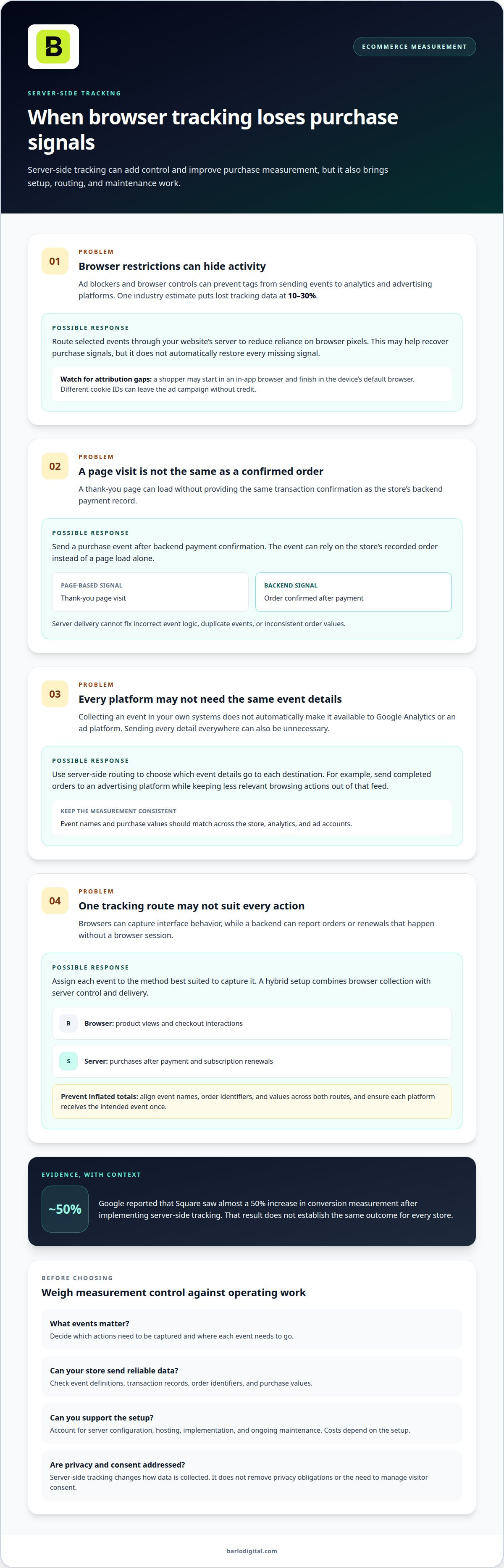
Tracking data loss occurs when browser controls or ad blockers prevent tags from sending actions to analytics and advertising platforms. One industry estimate puts the lost share at 10-30% of tracking data. That gap can make a campaign appear to generate fewer purchases than the store recorded, weakening decisions based on platform reports.
Server-side collection can reduce reliance on browser pixels, but it does not automatically recover every missing signal. For example, a purchase journey that starts in an in-app browser and ends in the device’s default browser may use different cookie IDs. The thank-you page might then receive credit instead of the ad campaign.
Data Collection and Activation
Data collection records actions such as product views, checkout starts, and completed orders. Activation sends selected events to platforms for reporting or advertising. The distinction matters: a store can collect an event in its own systems without making it available to Google Analytics or an ad platform.
Server-side routing lets a business choose which event details go to each destination. A completed order could be sent to an advertising platform, while less relevant browsing actions stay out of that feed. This control is useful only when event names and purchase values stay consistent across the store, analytics, and ad accounts.
Data Ownership and Deployment Options
Here, data ownership means control over collection, processing, and destinations, not a blanket legal claim over every data point. Server-side tracking gives the site operator more control over what leaves its server. That matters when several platforms request events but do not all need the same details.
Tracking can remain client-side, move to server-side, or use a hybrid collector that combines browser collection with server control. A hybrid setup can capture interface details in the browser while routing selected events through a server. The right arrangement depends on which actions matter and where they need to go.
Data Quality and Conversion Tracking
Data quality means that an event is accurate, complete, and tied to the right transaction. For ecommerce, a purchase event triggered after backend payment confirmation can rely on the store’s recorded order rather than a page load alone. This helps prevent a thank-you page visit from being counted as a completed sale.
Server-side delivery cannot fix incorrect event logic, duplicated events, or inconsistent order values. Google reported that Square saw almost a 50% increase in conversion measurement after implementing server-side tracking, but that result does not establish the same outcome for every store. A server-side tracking measurement setup needs sound event definitions and reliable transaction records.
Server-side versus client-side tracking
The main difference is where an event is sent and processed. That choice affects which actions analytics can capture and how much control you retain.
Client-Side and Server-Side Differences
Client-side tracking runs in the browser, which sends events directly to an analytics or advertising platform. Server-side tracking sends event data from your website’s server to the platform, often through an API or HTTP request. The difference matters because each method captures different information and creates different points of failure.
A browser tag can record interface details such as screen resolution, browser version, and clicks. It is also relatively easy to set up and widely documented. But blockers and browser restrictions can stop it sending events. Server-side tracking can limit which fields reach each destination, but it requires server configuration and accurate event routing.
Neither method is automatically more complete. A browser can capture a product-page interaction that the server never receives as a structured event. A server can receive a confirmed order even when a browser pixel fails to transmit its purchase event. For stores comparing reports, the distinction matters: a recorded click describes behavior, while a server-confirmed transaction represents an order.
Client-side tracking can collect some context more easily because the browser directly observes the shopper’s actions. Server-side transmission can reduce the data sent to analytics tools, but it depends on the website sending the right event and fields. If the order value is missing upstream, a server container cannot restore it simply by forwarding the event.
Combining Tracking Approaches
A hybrid method combines client-side collection with server-side control and delivery. It can be useful when ecommerce teams need browser-level behavior as well as server-based purchase signals, without relying on a single route for every event.
For example, a browser tag can capture product views and checkout interactions, while the store’s backend sends a purchase event after payment is recorded. Subscription renewals can also be sent server-side because they may happen without a browser session. This approach assigns each event to the method best suited to capture it.
Hybrid tracking still requires careful event design. Browser and server events describing the same purchase must not inflate conversion totals. Event names, order identifiers, and values need to align across both routes, and each platform should receive the intended event once. Otherwise, combining methods can create conflicting reports rather than a clearer picture.
Use client-side tracking when browser behavior and quick implementation matter most. Add server-side delivery when backend events or tighter control over destinations matter. The right method depends on the events your store needs to measure and the systems that must receive them.
Implementation complexity and ongoing costs
Server-side tracking adds infrastructure and maintenance that browser tags alone do not require. Google Tag Manager Server-Side is free, but a production setup still needs hosting, logging, event routing, and ongoing updates. These operating requirements affect both the budget and the workload after launch.
The main security risks include sending unnecessary personal data to platforms and exposing data through poorly controlled server access or routing. Reduce those risks by limiting the fields collected, restricting destinations to those that need them, and protecting the server environment.
The container is the server-side environment that receives and processes events before forwarding them. Higher traffic can increase hosting needs, so a setup that works at the current volume may need adjustment as event flow grows.
Implementation involves more than installing Google Tag Manager. The server must receive the intended events, map them to the right platforms, and forward only the selected fields. For example, a purchase event needs the order value and other details expected by the receiving platform. If the store changes its checkout or adds events, the routing may need updating too.
Maintenance continues after launch. A website update can change event triggers, a new event can require additional configuration, and an analytics platform can change its requirements. Each change creates a risk that events will stop, duplicate, or arrive with incomplete fields. Monitoring delivery and comparing platform reports with store records can reveal these failures before they distort campaign decisions.
Server-side tracking does not remove consent or privacy responsibilities. Businesses using it to collect personal data must explain their tracking methods in privacy policies and obtain visitor consent. The General Data Protection Regulation (GDPR) and California Consumer Privacy Act (CCPA) are relevant privacy laws for this work.
According to the European Union, the GDPR requires appropriate security and confidentiality for shared personal data, and sharing it with the fewest entities necessary for processing. In practice, control which event fields are sent and which platforms receive them. A server-side route is not permission to collect or forward every available detail.
Before implementation, define the events, destinations, and fields your store actually needs. Then account for hosting, traffic, logging, testing, and future changes. Google Tag Manager Server-Side removes a software charge for the container, not the operational cost of running and maintaining it.
Privacy regulations, browser restrictions, and ad blockers
Server-side tracking can improve control over event collection and reduce reliance on browser scripts. Its advantages include greater control over routing and a way to capture some events independently of browser pixels, not permission to ignore privacy choices.
Privacy Regulations and Tracking Restrictions
Privacy regulations govern how businesses collect and share personal data, while browser restrictions limit how tracking scripts operate. Both affect what an ecommerce store can collect and send to analytics platforms.
The European Union says the GDPR requires appropriate security and confidentiality for shared personal data, with sharing limited to the fewest entities necessary for processing. The CCPA is also relevant to server-side tagging. A server route changes the data path, not the need to respect consent settings and explain tracking practices.
For example, an order event might need to reach an ad platform, while unrelated browsing details do not. Restricting destinations and fields limits unnecessary exposure and makes the data flow easier to assess.
Ad Blockers and Browser Protections
Ad blockers and browser privacy protections can stop or limit scripts that send events from a shopper’s browser. This matters when a blocked pixel is the only way to report a product view, checkout action, or purchase.
Ad blockers had 912 million users worldwide in the second quarter of 2023, and over 42% of internet users globally use them. Those figures describe different measures, but both show why browser-based tracking can miss activity across substantial traffic.
Browser protections can also affect cookies and cross-site tracking. A missing browser event may leave analytics platforms with less information than the store’s order system records.
Tracking Accuracy and Data Loss
Tracking accuracy describes how closely reported events reflect real customer actions and transactions. Blocked scripts can create gaps between platform reports and store records, distorting the apparent contribution of campaigns.
That gap can affect decisions such as reallocating advertising spend. If a platform receives fewer purchase events than the store records, its conversion report may understate results. But a higher event count is not automatically more accurate: duplicated purchases or incorrect values can inflate reporting.
Use backend-confirmed orders as a comparison point, then investigate whether missing events stem from blocked scripts, broken tags, or event errors. Browser restrictions explain some discrepancies, but not all of them.
Reduced Impact of Ad Blockers
Server-side tracking can reduce the impact of ad blockers when the website server receives an event independently of a blocked browser pixel. The server can then forward selected actions to analytics or advertising platforms.
For example, the store may record a payment-confirmed order and send it server-side even if the browser script fails. This can improve measurement coverage for that transaction, provided the backend event is configured correctly and the relevant data may be shared.
Server-side delivery does not reveal actions the server never receives, restore every lost browser identifier, or override a visitor’s choice. Treat it as another data path, not a way around restrictions. Keep consent settings connected to event routing, and send only the fields and events each destination needs.
Server-side tracking tools for ecommerce and marketing
The useful question is not which tracking tool has the most features, but whether it fits your store’s platform, analytics needs, and advertising workflow. The pros and cons of server-side tracking for ecommerce depend partly on integration effort: a tool that fits your existing setup is easier to maintain than one that needs custom connections across every system.
Start with the platform interfaces your store already uses. Shopify, WooCommerce, and other ecommerce systems differ in how they expose order and customer information. Analytics and advertising platforms also have different event formats. Choose tools with both ends of that connection in mind, rather than treating a server container as a complete solution on its own.
Google Tag Manager Server-Side is one option for managing server-side tagging. Assess it against the technical skills available to maintain the container, the integrations your store needs, and the monitoring process after launch. Native platform integrations may reduce custom configuration for specific connections. A tag manager offers more centralized control, but it also creates another environment that needs ownership and upkeep.
For each candidate tool, assess the practical fit:
- Platform coverage: Confirm that the store, analytics tools, and ad platforms can exchange the required event data through supported integrations.
- Maintenance ownership: Establish who updates connections when checkout flows or platform requirements change.
- Event definitions: Keep a shared reference for what events such as purchase, refund, or subscription renewal mean in your reporting.
- Diagnostic visibility: Make sure the setup provides a way to identify failed connections and malformed events.
- Business use: Tie each event to a reporting or campaign decision, rather than collecting it without a defined purpose.
When weighing the pros and cons of server-side tracking, do not choose tools based only on a platform’s name or feature list. The key test is whether your ecommerce platform, analytics setup, and advertising accounts can work together without fragile custom dependencies.
A sensible tool stack gives each component a clear role and owner. Google Tag Manager Server-Side may suit a store that benefits from centralized tagging; a direct integration may be simpler for a narrower need. Choose the least complicated combination that supports the measurement decisions your team actually makes.
Barlo Digital
Barlo Digital helps ecommerce businesses identify where tracking breaks down and whether server-side measurement fits their store. An ecommerce tracking and measurement audit can examine event definitions, purchase data, and how information reaches analytics and advertising platforms.
Turn to Barlo Digital when reported conversions conflict with store records, key events fail to reach platforms, or tracking changes have made measurement unreliable. Our tracking and measurement work focuses on clarifying the data flow and identifying the fixes needed, not implementing server-side tracking for its own sake.
If you want to assess your ecommerce tracking, contact Barlo Digital to discuss your measurement setup.
Make the measurement decision operational
The pros and cons of server-side tracking for ecommerce matter only when they affect the quality of your team’s decisions. Set a clear standard for purchase reporting, identify which events need server-side delivery, and keep privacy choices connected to the data flow. Then apply that standard consistently to measurement and campaign decisions.
Barlo Digital can assess your ecommerce measurement setup and connect tracking decisions to paid media across Meta, Google, and TikTok. Our work also includes local SEO and AI search, but for an ecommerce tracking question, the immediate priorities are accurate event flow and conversion data you can use.
Bring us the point where your store records, analytics, and advertising reports diverge. Discuss your tracking setup with Barlo Digital, and make the next measurement decision with a clearer view of the system.
Frequently Asked Questions
Do You Need Both Tracking Methods?
No. Use both when browser behavior and backend transactions each provide information your reporting needs. For example, a product-page interaction happens in the browser, while the store records a completed order. A hybrid setup can cover both. If your only priority is confirming paid orders, adding browser events may create extra work without improving that specific measurement.
What is server-side tracking for ecommerce and how does it work?
Server-side tracking sends ecommerce events from a website’s server to analytics or advertising platforms. A store can pass events such as completed orders through a server container, which routes selected information to its destinations. For a practical test, follow one test order through the store record, the server route, and the destination report. This shows whether event names and order details stay consistent along the way.
How does server-side tracking compare with browser-side pixel tracking?
Browser-side pixels send information from a shopper’s browser, while server-side tracking sends it from the website’s server. Pixels can capture browser context, such as clicks or screen details, but depend on scripts running successfully. Server events can use information recorded by the store. For product-view reporting, browser collection may capture useful interaction details; for order reconciliation, a backend record provides a separate transaction reference.
How much does ecommerce server-side tracking cost, including setup and ongoing hosting?
Setup and maintenance effort depend on event volume, integrations, and the store’s technical architecture. Budget for testing and later adjustments as the site or platform requirements change. These are infrastructure costs, not a quote for professional implementation.
How does server-side tracking affect data accuracy, attribution, and conversion reporting?
Server-side tracking can improve conversion reporting when events come from reliable store records, but it cannot guarantee accurate attribution. For example, a server may confirm an order while the campaign identifier needed to connect it to an ad is missing or inconsistent. Compare order totals and values across the ecommerce platform, analytics, and ad reports. Before changing campaign decisions, investigate duplicate events, missing identifiers, and differences in conversion definitions.
What privacy laws and consent requirements apply to ecommerce server-side tracking in the United States?
The laws that apply depend on the business and the people whose data it collects; server-side routing does not remove privacy obligations. The California Consumer Privacy Act is relevant, and the General Data Protection Regulation may apply depending on its scope. Explain tracking practices in your privacy policy, respect visitor choices, and appropriately limit data access and sharing. A server container is not a substitute for consent controls.
How do you set up server-side tracking for Shopify, WooCommerce, or other ecommerce platforms?
Start by listing the events and destinations your store needs, then identify where each event originates. Configure the server route for those events, map the required fields, and test a purchase against the store’s order record and destination reports. Shopify, WooCommerce, and other platforms differ in their integrations and event flows, so configuration depends on your store’s setup. Test again after checkout or analytics changes.
Which ecommerce analytics and advertising platforms support server-side tracking, such as GA4 and Meta Conversions API?
Google Analytics and Meta are common destinations for ecommerce events, but each connection depends on the platform’s supported event method and required fields. Google Tag Manager Server-Side can route events onward; it does not make every destination automatically compatible. Before choosing an integration, match event names and data requirements to the destination. Then validate a test purchase in the store and platform reports to catch formatting or duplication issues.

Article by
Carlos Benavides
Carlos Benavides founded Barlo Digital and is its Director of Paid Media and Performance. He has fifteen years in direct-response marketing, more than $50M in lifetime ad spend, and a B.S. in Computer Science, which is why tracking at Barlo Digital is built by hand. Barlo Digital is a director-led paid media and search agency serving US ecommerce brands, home-service companies and practices.


